-50%New accounts: up to 50% off your first planUnlock my offer

What's new

Everything we shipped in Mako since August

Making Mako better is our #1 focus. We read every complaint and piece of feedback and worked through them one by one. This month: Mako now works for you on Autopilot.

425 fixes and improvements since August 7

New this month. The big five.

Recorded in the real app with a made-up cleaning company. Nothing went live.

New · Autopilot

Autopilot: Mako now works for you, even while you sleep

Give Mako a goal and a monthly budget. Mako plans your week, makes new ads, checks them itself and brings them to your chat. It asks before anything goes live, and shows what it did, what it cost and why.

  • Your goal in one sentence, a budget from your plan
  • Fresh ads with real variety, checked by Mako before you see them
  • Launching always asks you first. Turn it off any time
Turn on Autopilot

New · A simpler Mako

Mako got a lot simpler. And there is a whole new way in: the Reef

Mako now walks you through five numbered steps: your products, Research, Make ads, Run Ads and Post. The same on your phone and your computer. Or dive into the Reef: your business as an underwater world, with one clear next step and Mako right at the bottom.

  • Pick Classic or the Reef, and switch any time
  • Home shows your next step, this week and a box to ask Mako
  • The Mako bar always shows what Mako is doing
See the new Mako

Better · Clone any ad

Clone any winning ad, rebuilt for your business

Before Mako clones an ad, it works out why that ad works. Then it rebuilds that idea with your real things: your photos, your reviews, your offer and your buyers. No borrowed mascots, no made-up sales, and your product keeps its real shape.

  • See the whole ad before you clone it
  • Only your real offers and real customer quotes
  • Your logo stays out when the original has none
Clone a winning ad

New · Mako in Claude and ChatGPT

Supercharge your favorite AI with Mako

Connect Mako to Claude and ChatGPT and your AI knows ads: ad knowledge from 800,000+ real ads, seen 100 billion+ times, research into who buys from you, and Mako's whole ad maker. Ask in plain words, and Mako answers with pictures: your competitors, your buyers, your ads.

  • Ask about your competitors, your buyers or your results
  • Make ads, videos and voice-overs without leaving the chat
  • You choose how many credits it may use per day
Connect your AI app

New · Upload your personas

Already know your ideal audiences? Bring them

Upload the persona research you already have: a PDF, a Word file, slides, screenshots or pasted text. Mako reads it and finds every persona inside, even several in one file. Tick the ones to keep, add them to one or more products, and make ads for exactly those buyers.

  • One file can hold several personas
  • Add them to several products at once, or copy one later
  • Buyer signals start by themselves
Upload your personas

Major updates. Biggest first.

The screens below are the real app, filled with a demo brand.

Create adsNew

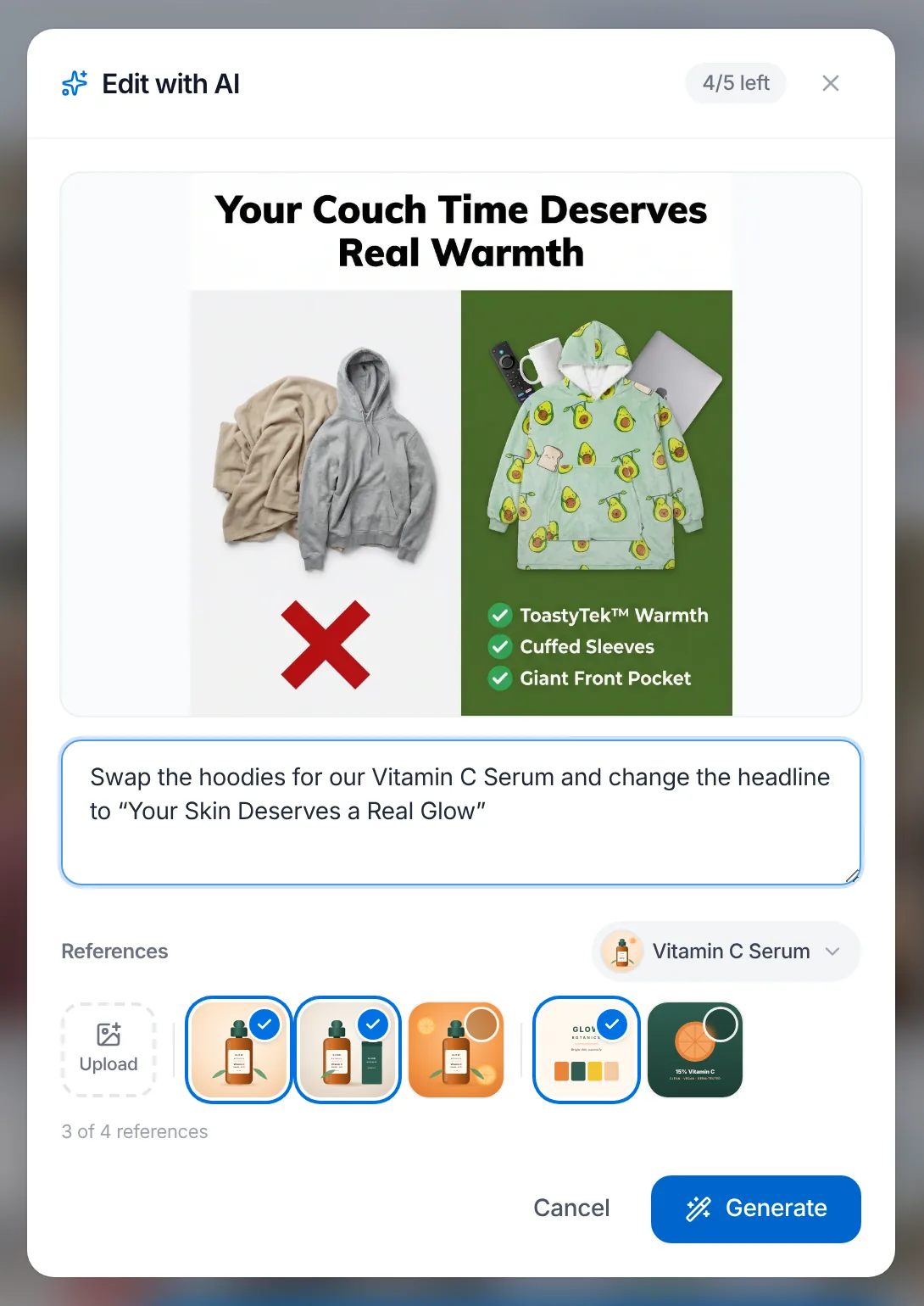
Edit with AI is now a real image editor

Click any word on your ad and type a new one, drag things to move them, or say the change in one sentence. Mark several spots at once and Mako makes all the changes in one go. Your first 5 edits on every image are free.

Run AdsNew

Let Mako set up your campaign in a short chat

Run Ads opens on one button. Mako asks one thing at a time (which product, which ads, where and how much a day) and builds the campaign while you answer. Target whole countries, or one city, region or postcode.

Ask MakoNew

Tell Mako once. It remembers

Say "never use white backgrounds" and Mako asks: Remember? Tap yes and every new ad, script and idea follows it. Change your mind? Undo it any time.

VideoNew

Pro edit: your videos, edited like a pro

After a custom video is made, Mako edits it like a top short-form editor: a hook in the first second, moving text, zooms, your real product shots and real sound effects on the big moments.

Create adsNew

Hook text and captions on any video or photo

Open any video or photo, also one you upload yourself, and add hook text and word-by-word captions. Write the hooks yourself or let Mako write three, and export each one as its own ad.

Create adsBetter

Create Variations plans every ad for you

Pick a winning ad and Mako says what made it win, then plans close versions that change one thing. You see the whole plan as pictures before you spend a credit.

Create adsNew

Every size at once

Clone an ad as a square post, a feed post and a story in one go. Each one comes out in the exact size, with no more cut-off logos.
VideoNew

Trim your videos

Slow start or an awkward ending? Drag the edges to keep only the best part. Mako saves it as a new version, so your original stays safe.

VideoBetter

Natural voices, in every language

Every video gets a natural voice that fits the person on screen, a different one per video. Videos in other languages are spoken by a native voice of that language.

Run AdsNew

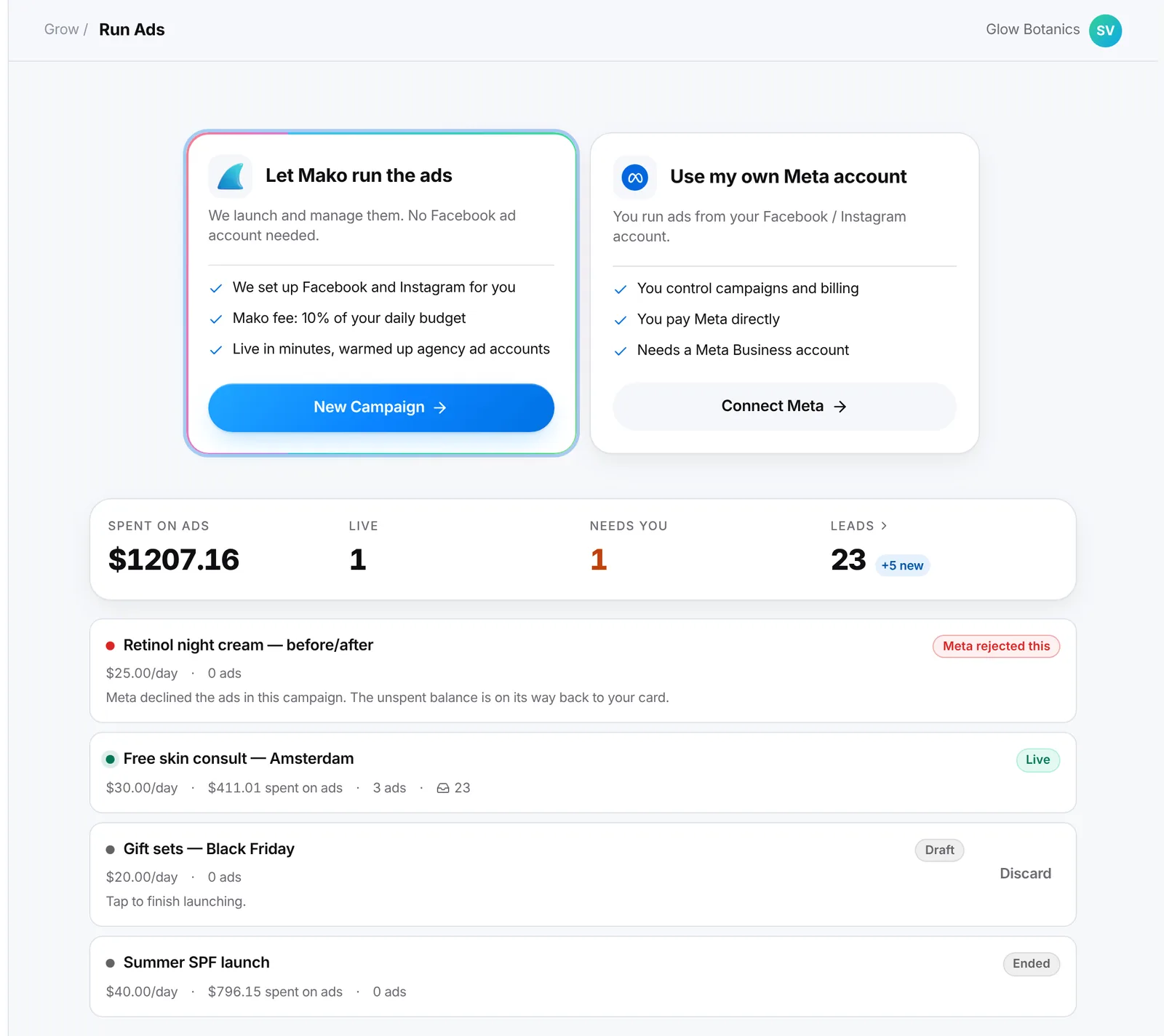
Mako can now run your Facebook and Instagram ads for you

Pick your ads, a goal and a daily budget. Mako launches them on its own ad account and keeps an eye on them, so you don't need a Meta ad account or any ads experience.

  • See what you spent, the clicks, the results and the cost per result
  • Pause, change the budget or stop any time; money you haven't spent comes back
  • Your ads are checked with Meta before you pay
Run Ads in Mako: choose "Let Mako run the ads" or "Use my own Meta account", with your campaigns, money spent and leads below

Run AdsNew

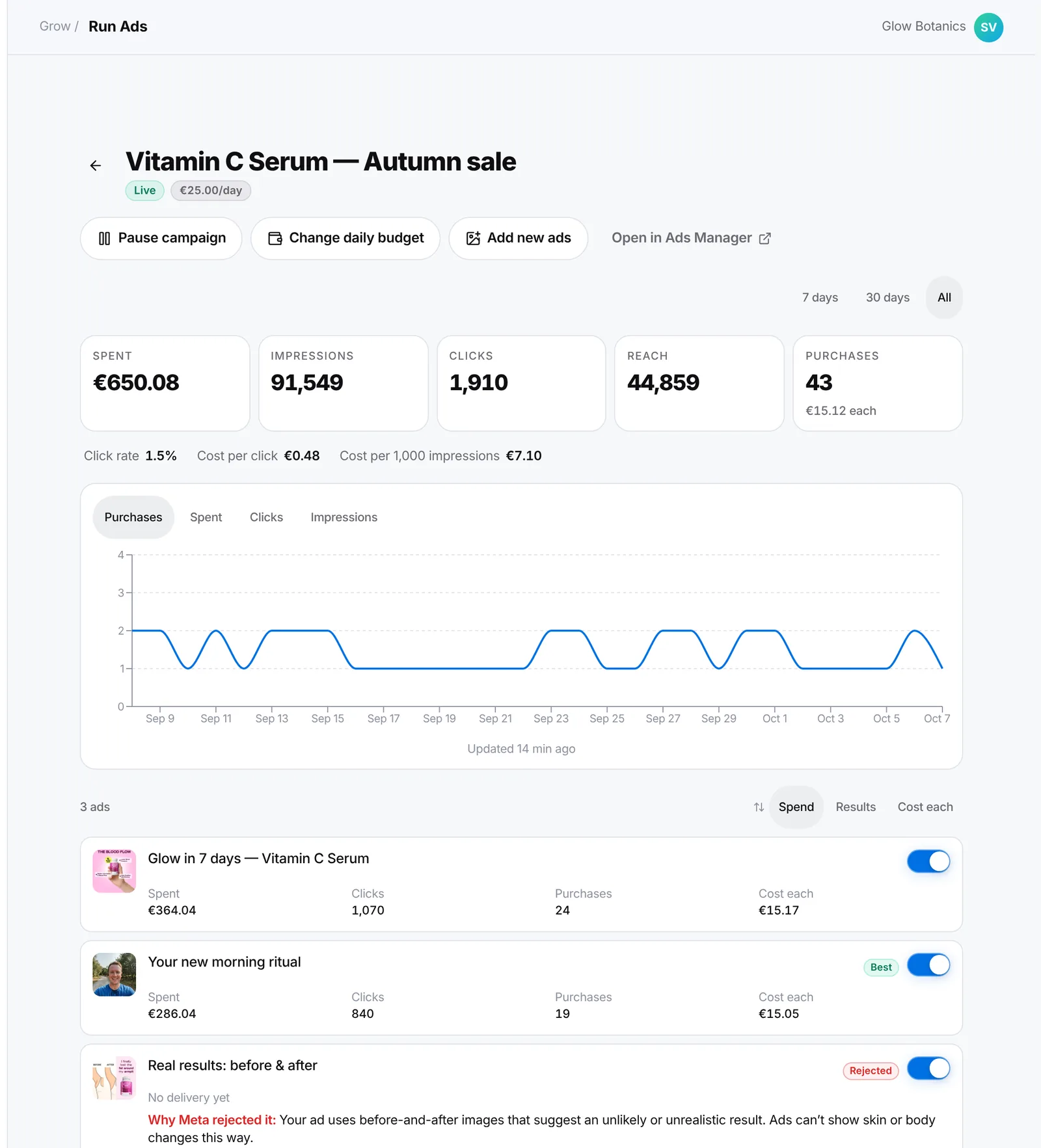
Every campaign on one page, with numbers you can trust

Run Ads shows each campaign's spend, clicks, reach and results, counted the same way as Meta Ads Manager, with a chart over 7 days, 30 days or all time.

  • Turn any single ad on or off with a switch
  • Pause, change the daily budget, add new ads or run an ended campaign again
  • If Meta rejects an ad, you see Meta's reason in plain words
A live campaign in Run Ads: spend, impressions, clicks, reach and purchases, a chart, and three ads with on/off switches

Ask MakoNew

Ask Mako is now your operator: it does the work for you

Before, Ask Mako could only tell you which buttons to click. Now it reads your products and buyer research, proposes a plan and makes the ads itself: image ads, custom images and videos, testimonial videos, native stories and more.

  • Anything that spends credits stops on a card first, with every choice and the cost: Allow, Not now or Always allow
  • Watch every step live, with galleries you can tap and buttons that open the right screen
  • Your product photos and Brand Book are always used
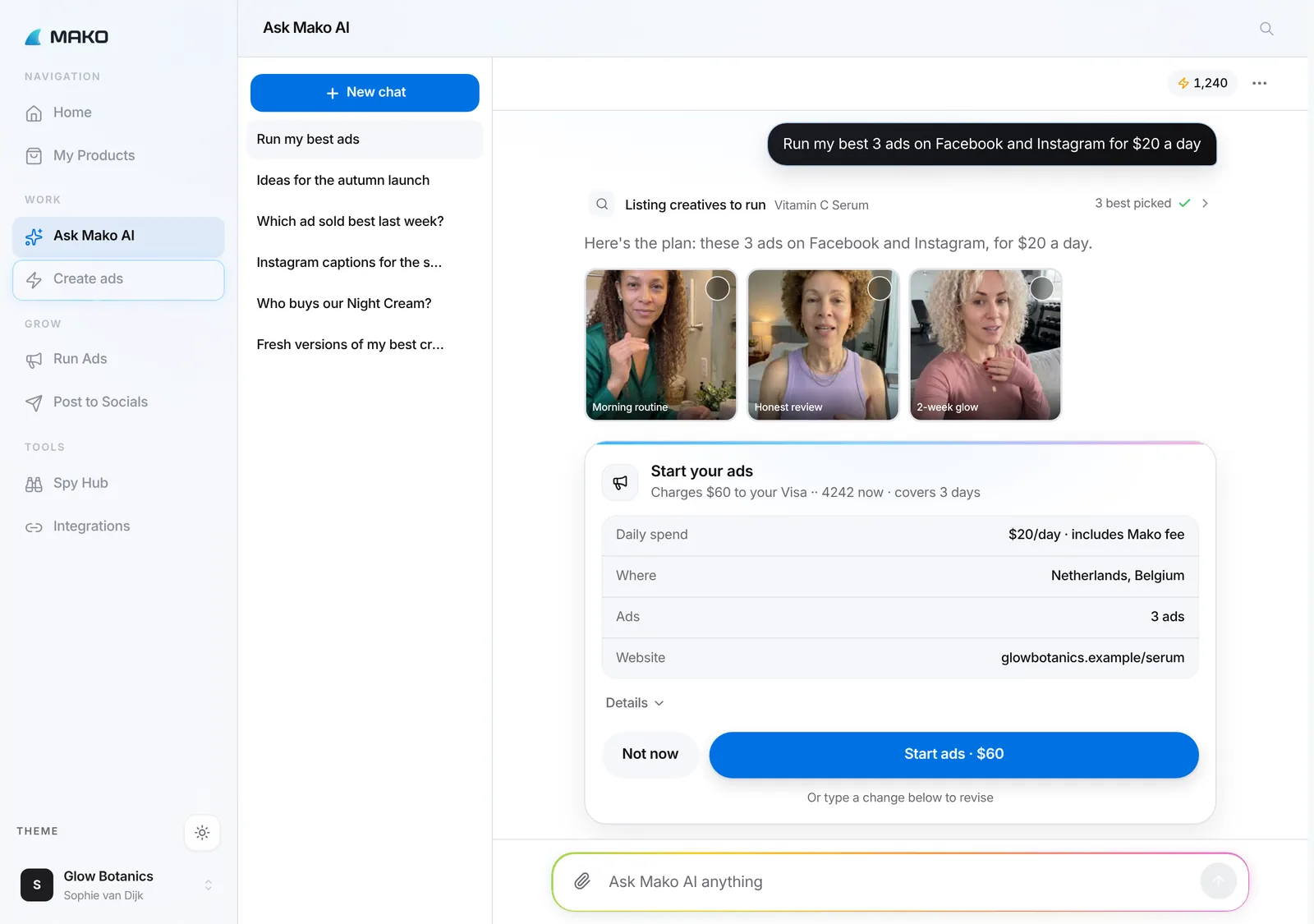
Ask Mako: "Run my best 3 ads on Facebook and Instagram for $20 a day", three picked ads and a Start your ads card with the cost, Not now and Start ads
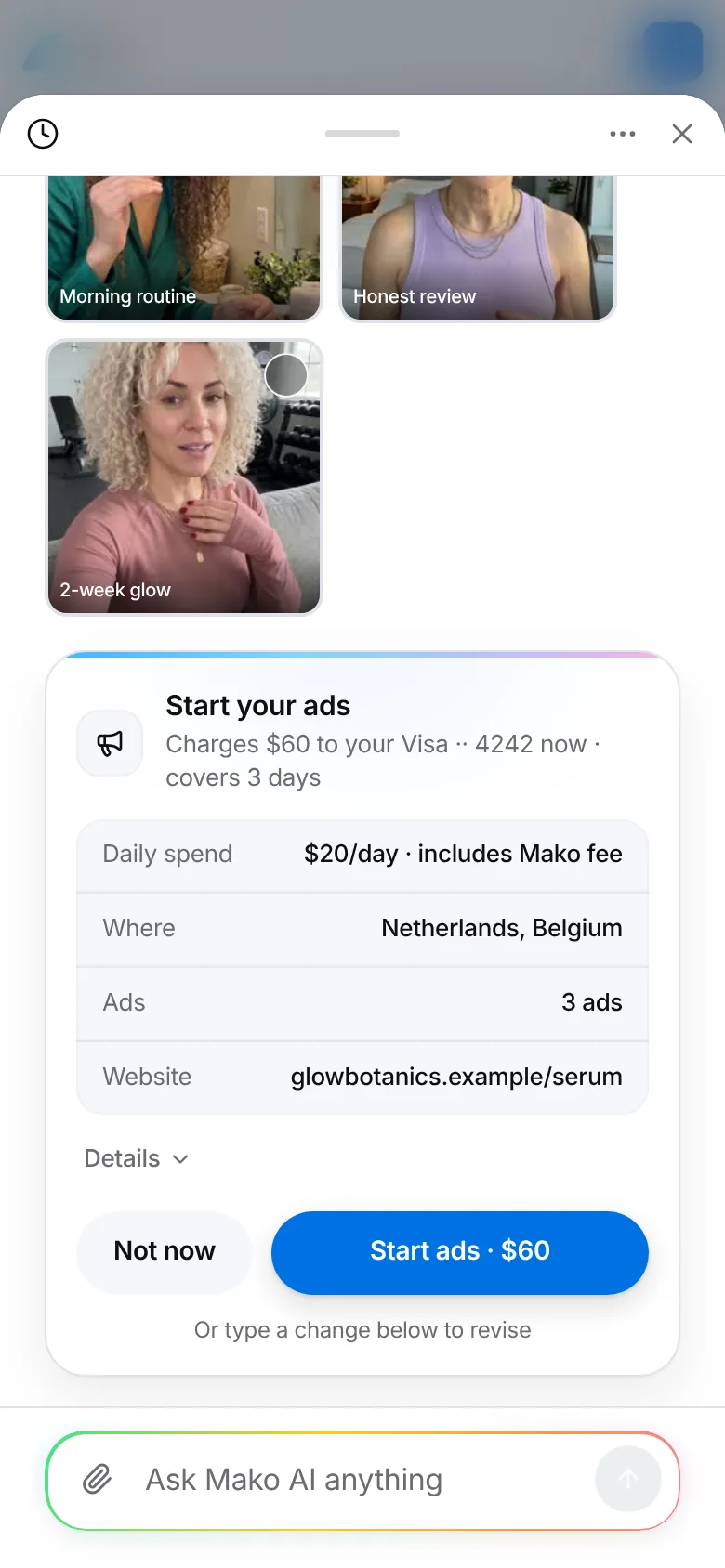
The same Start your ads card in Ask Mako on a phone

Ask MakoNew

Ask Mako can launch your ads and posts, right from the chat

Tell Ask Mako what you want, like "run my best 3 ads for $20 a day". It fills in the details, shows one clear card with the cost first, and only goes ahead when you tap Allow.

  • Check, pause, resume or re-budget a campaign by asking
  • Turn your best Facebook and Instagram ads into new image and video variations
  • Ask why an ad works: Ask Mako can even watch your video ads
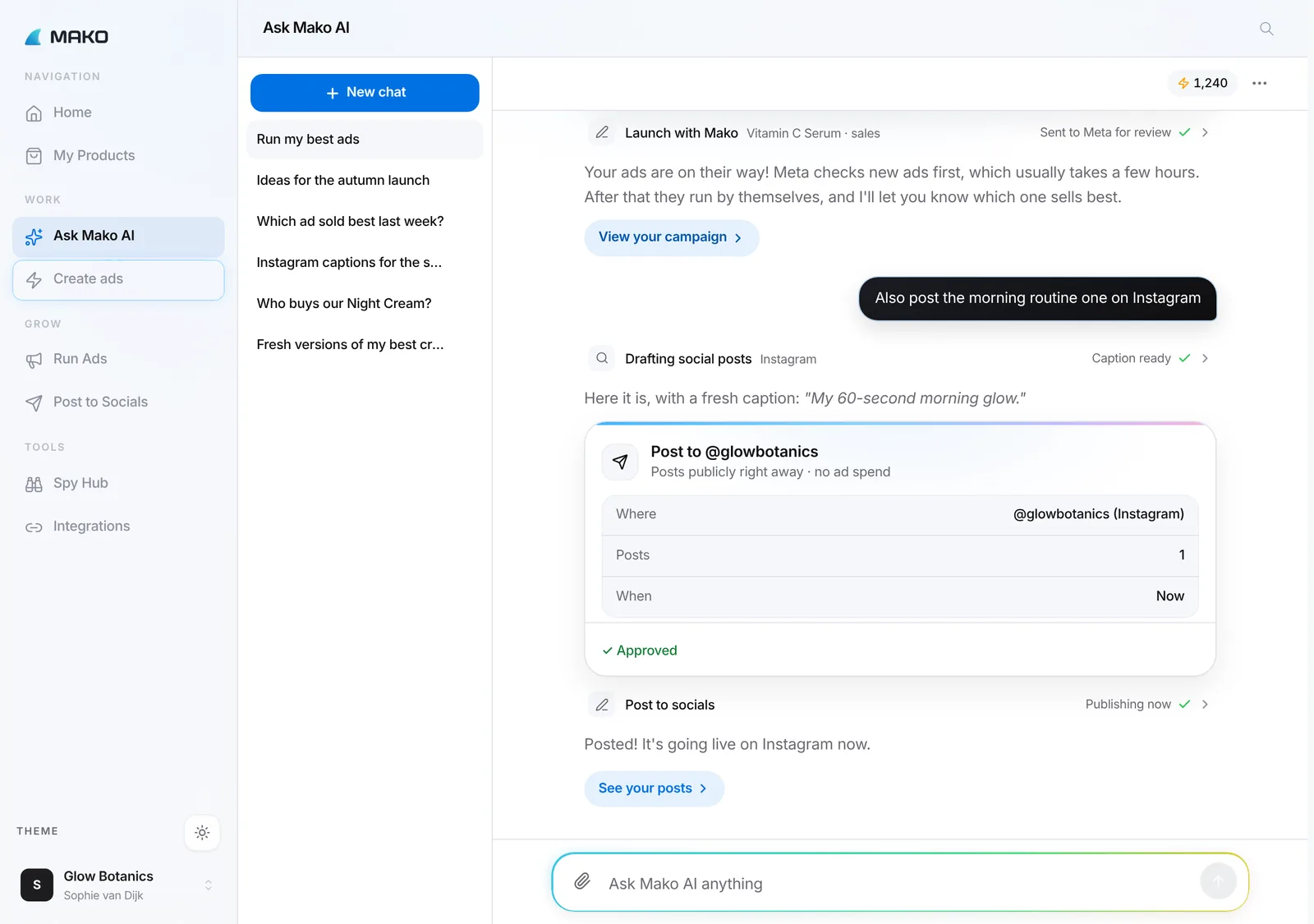
Ask Mako after the approvals: ads sent to Meta for review with a View your campaign button, then a caption drafted and a post published to Instagram

SocialsNew

Post to Instagram, Facebook and TikTok, and see what works

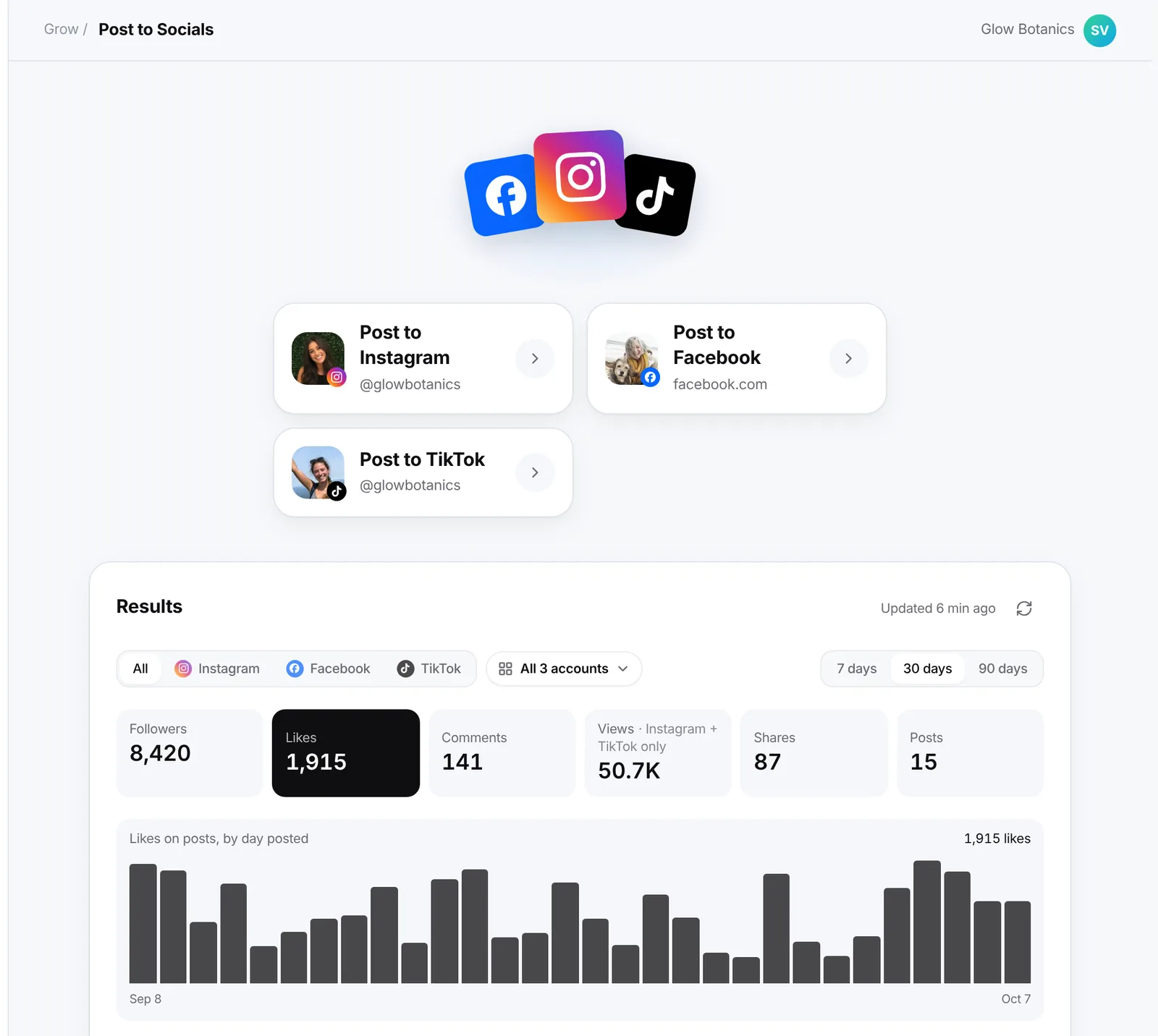
Plan posts for all your accounts from one place, now including TikTok. One Results view shows followers, likes, comments and views for every channel, with a chart.

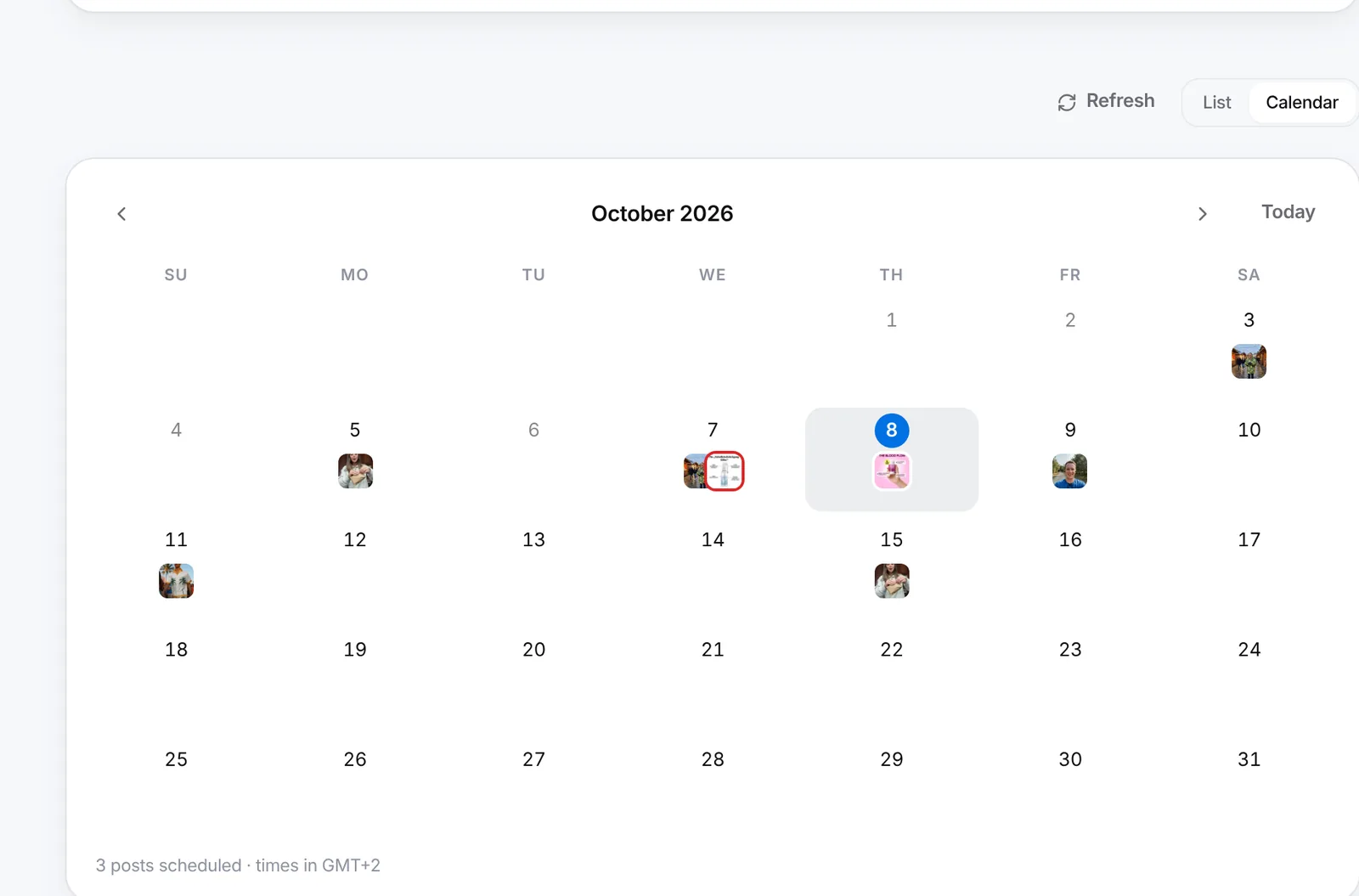
  • A calendar of everything you've planned
  • Edit, reschedule, retry or remove any post
  • Captions are free and are written for all your posts at once
Post to socials: Post to Instagram, Facebook and TikTok, and one Results view with followers, likes, comments, views and a chart
The calendar view of planned posts in Post to socials

Run AdsNew

Every lead in one inbox

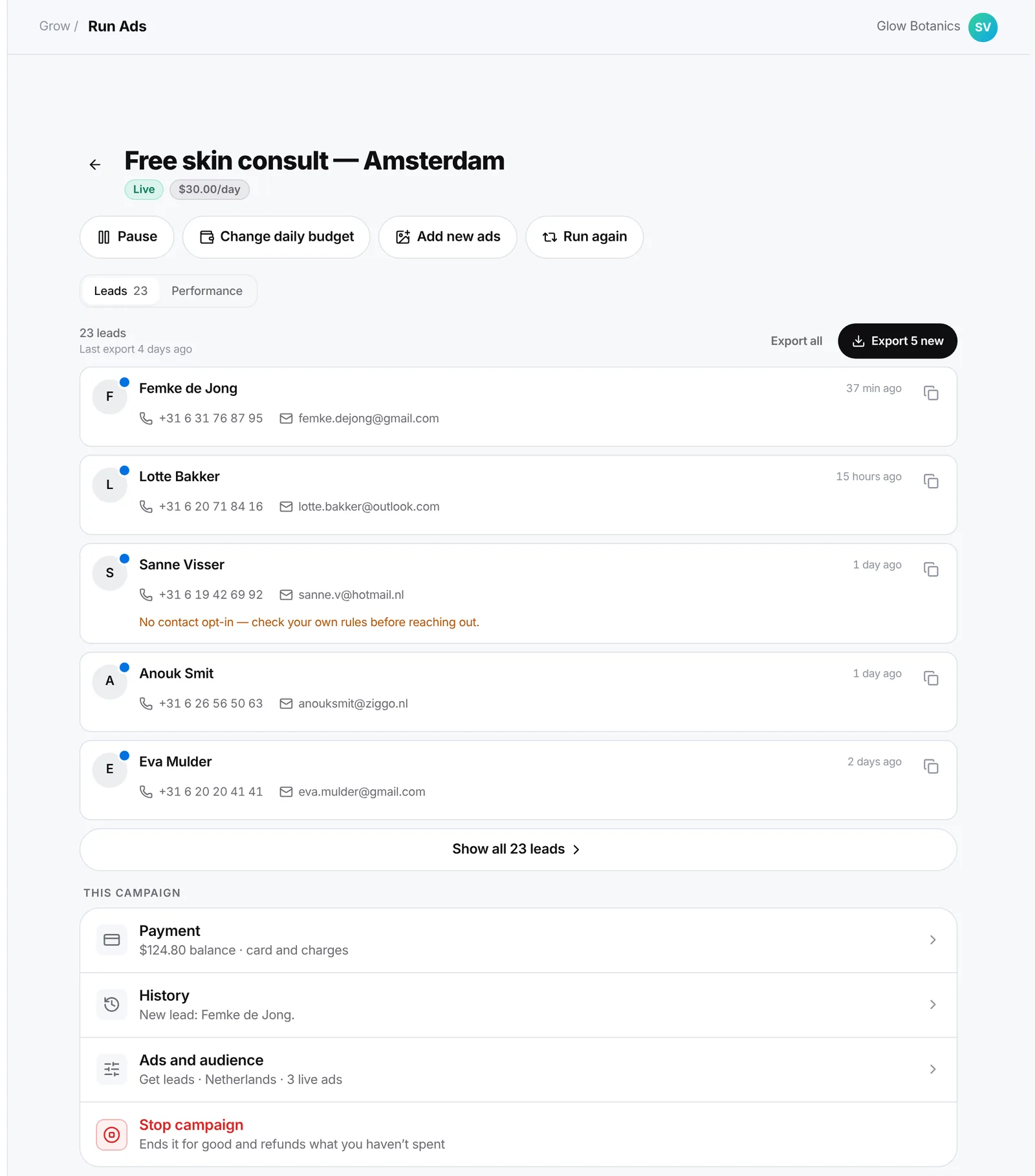
Lead campaigns that Mako runs collect a name, phone number and email. Each new lead is emailed to you within seconds and lands in a Leads inbox, where you can call or email them in one tap.

  • Export only the leads you haven't exported yet
  • Each lead is credited to the ad they came through
A Mako-run leads campaign with 23 leads, each with name, phone and email, and an Export 5 new button

Run AdsNew

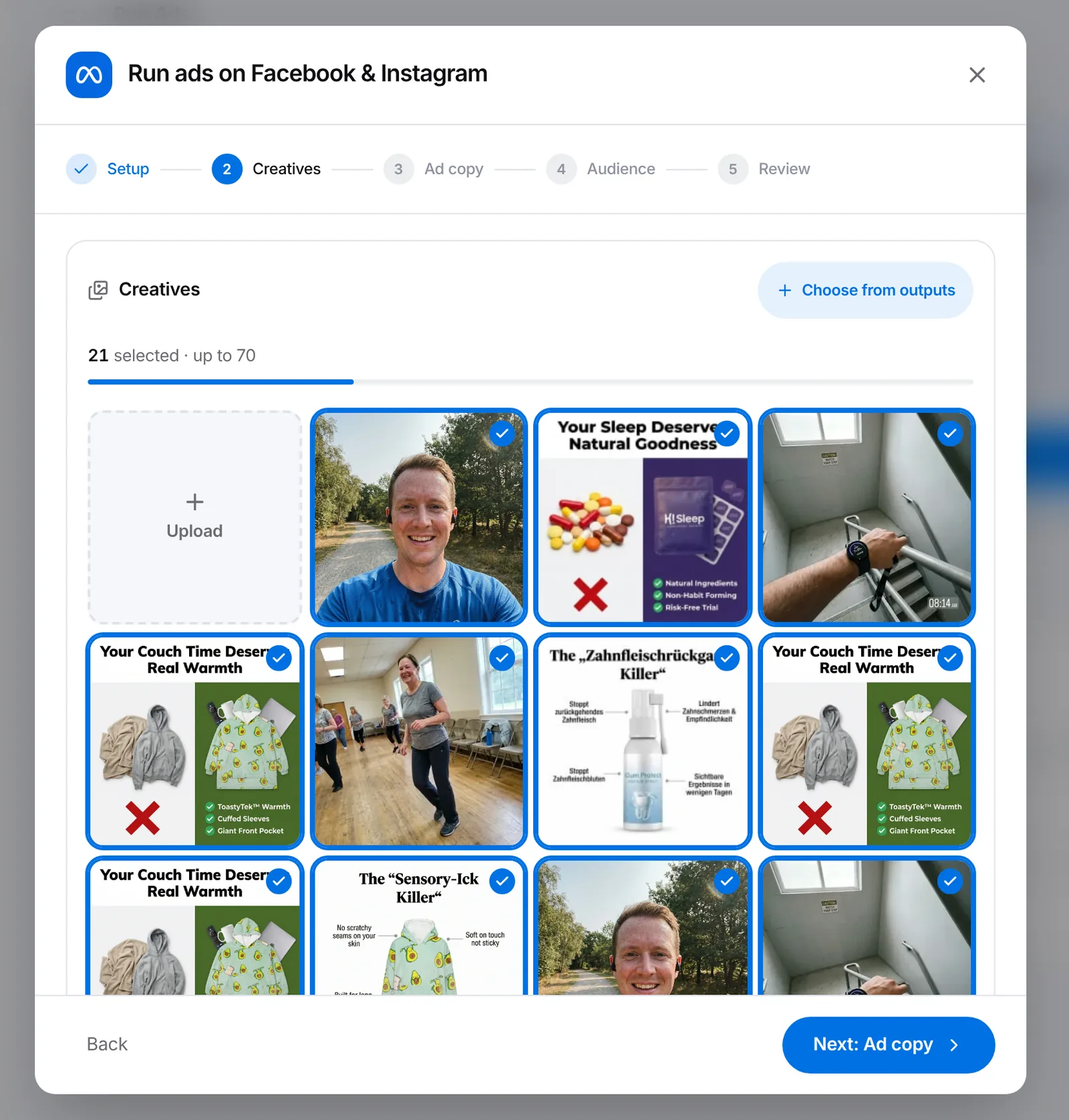
Launch up to 70 ads at once, with the ad copy already written

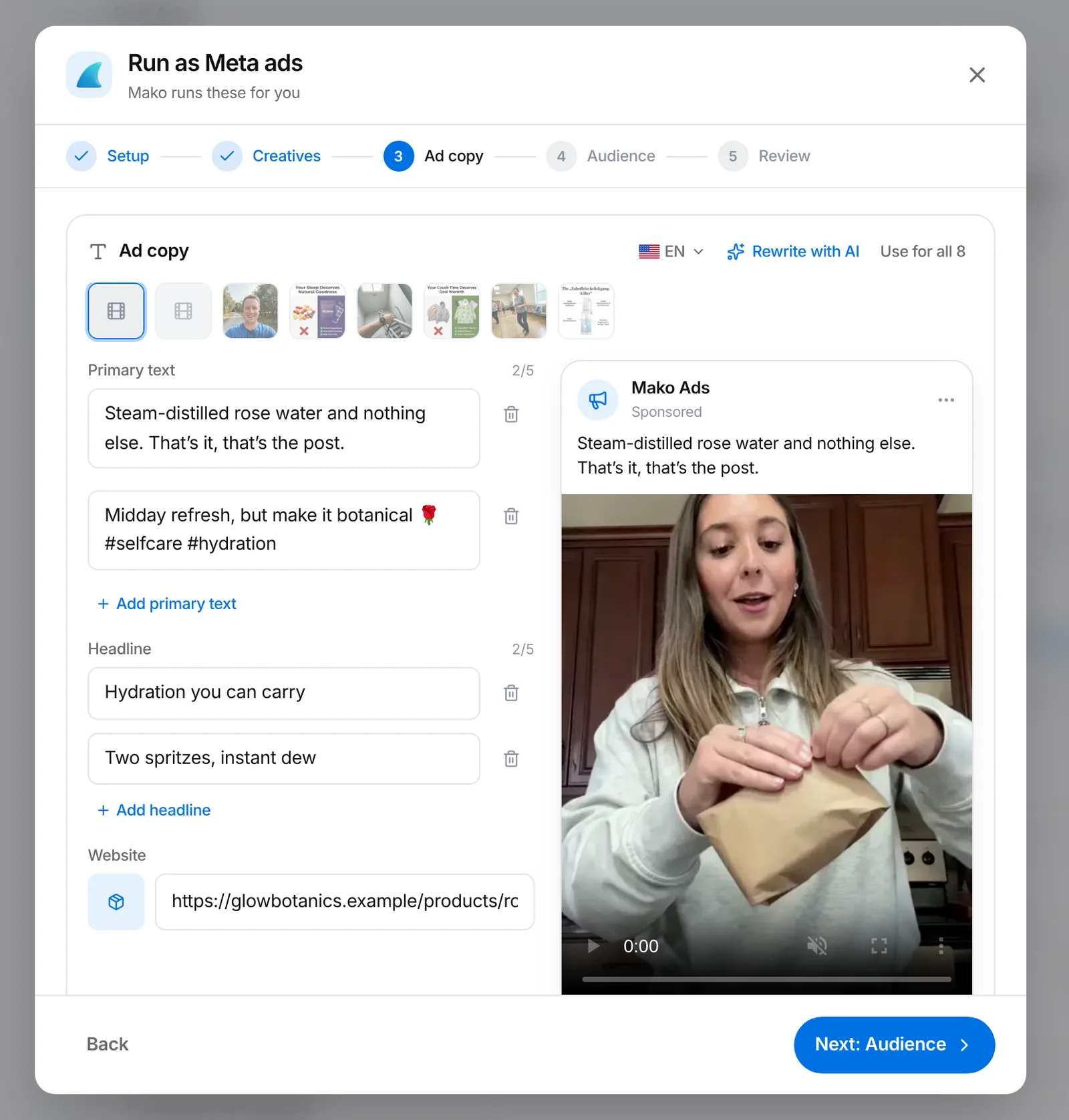
Pick your creatives and Mako splits them into ad sets and divides your budget. At the copy step the headlines and texts are already filled in, in your product's language, next to a live preview.

  • Ad copy no longer costs credits
  • Pick the language of the copy with one tap
The Run ads on Facebook & Instagram wizard with 21 of up to 70 creatives selected
The ad copy step with primary texts, headlines and a live feed preview of the video ad

SocialsNew

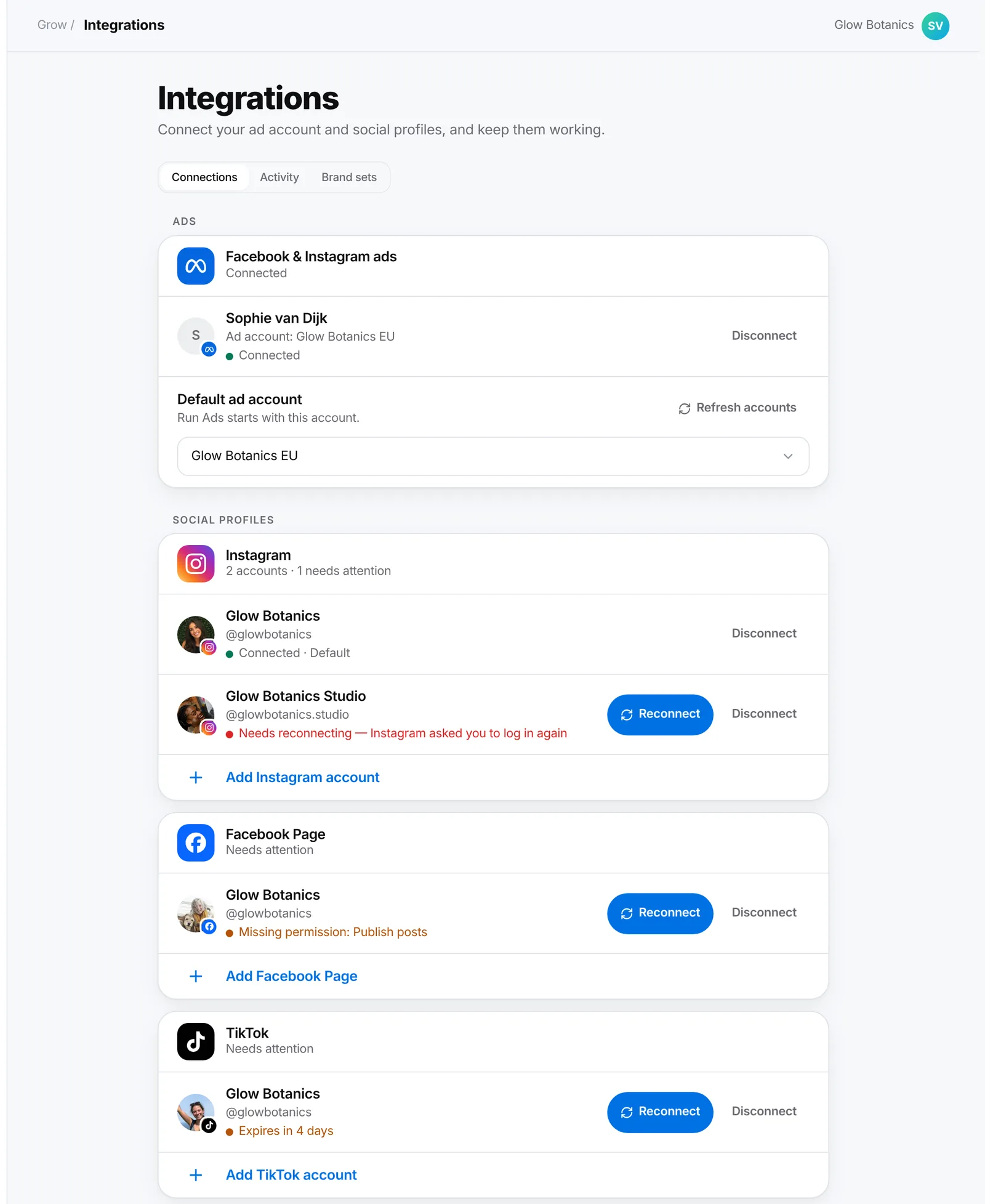
All your connections in one place

Integrations lists every ad account and social profile you've connected and which one is the default. It tells you when one needs reconnecting or is missing a permission, with a Reconnect button right there.

Integrations: Facebook & Instagram ads, Instagram, Facebook Page and TikTok, each with its status and a Reconnect button where needed

Spy HubNew

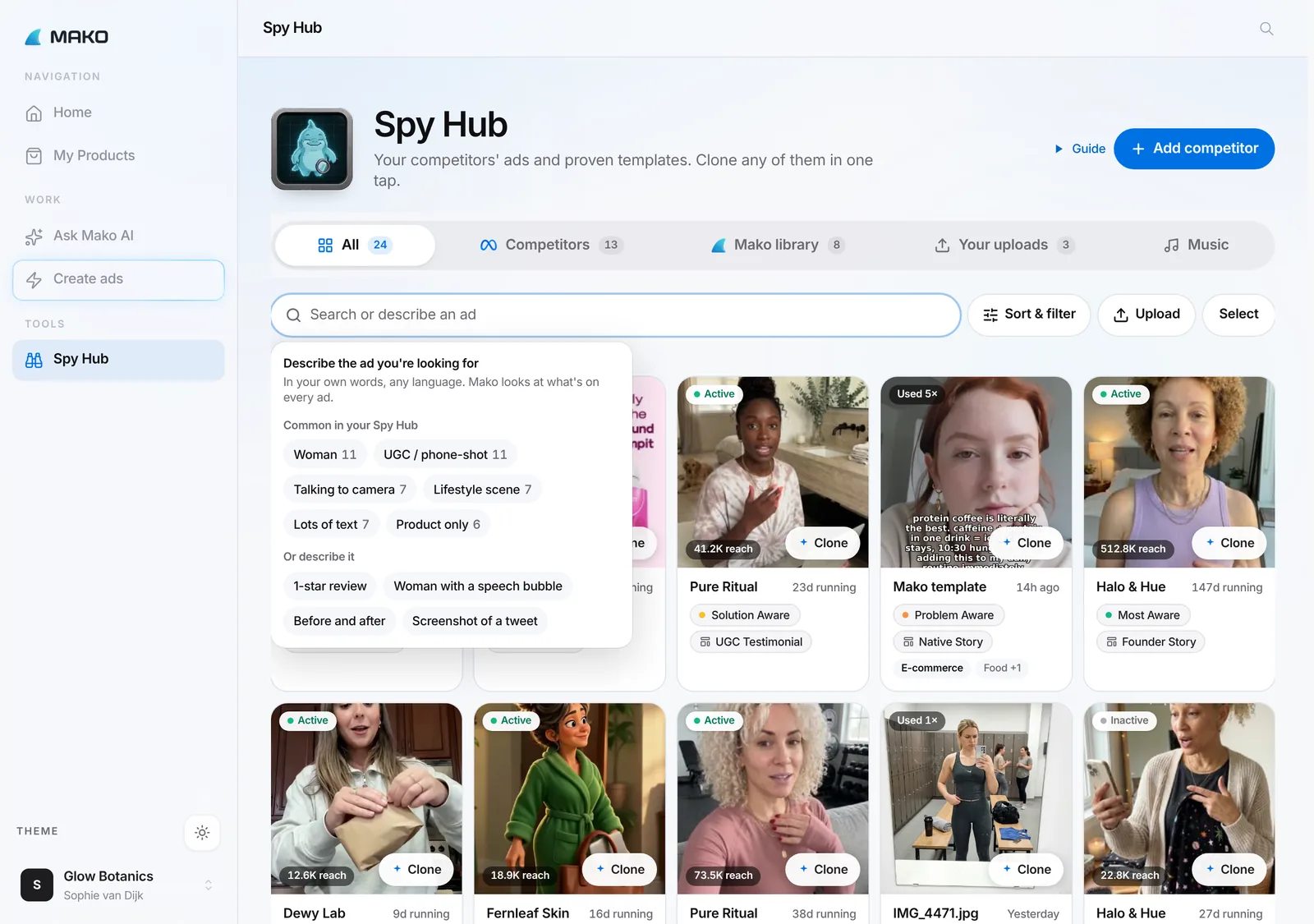
Spy Hub: describe the ad you're looking for

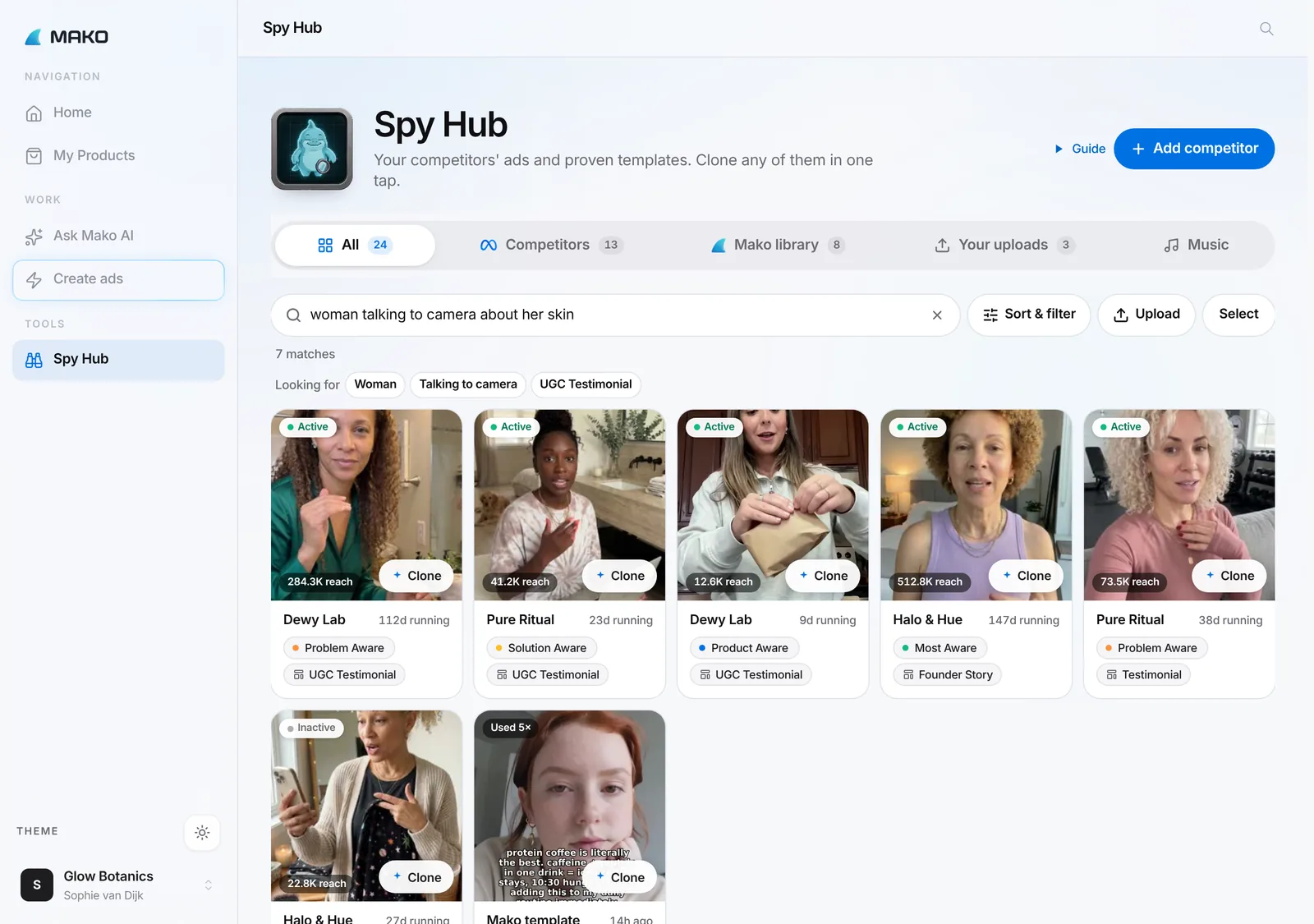
Search your competitors' ads the way you'd describe them, like "1-star review" or "woman with a speech bubble", then sort and filter across every ad.

  • Every ad opens in one clean detail card with arrows to browse
  • Add a competitor and their ads start showing within seconds
Spy Hub with the search box open: "Describe the ad you're looking for", common tags like Woman and Talking to camera, and examples like 1-star review
Spy Hub results for "woman talking to camera about her skin": 7 matching competitor ads

Spy HubNew

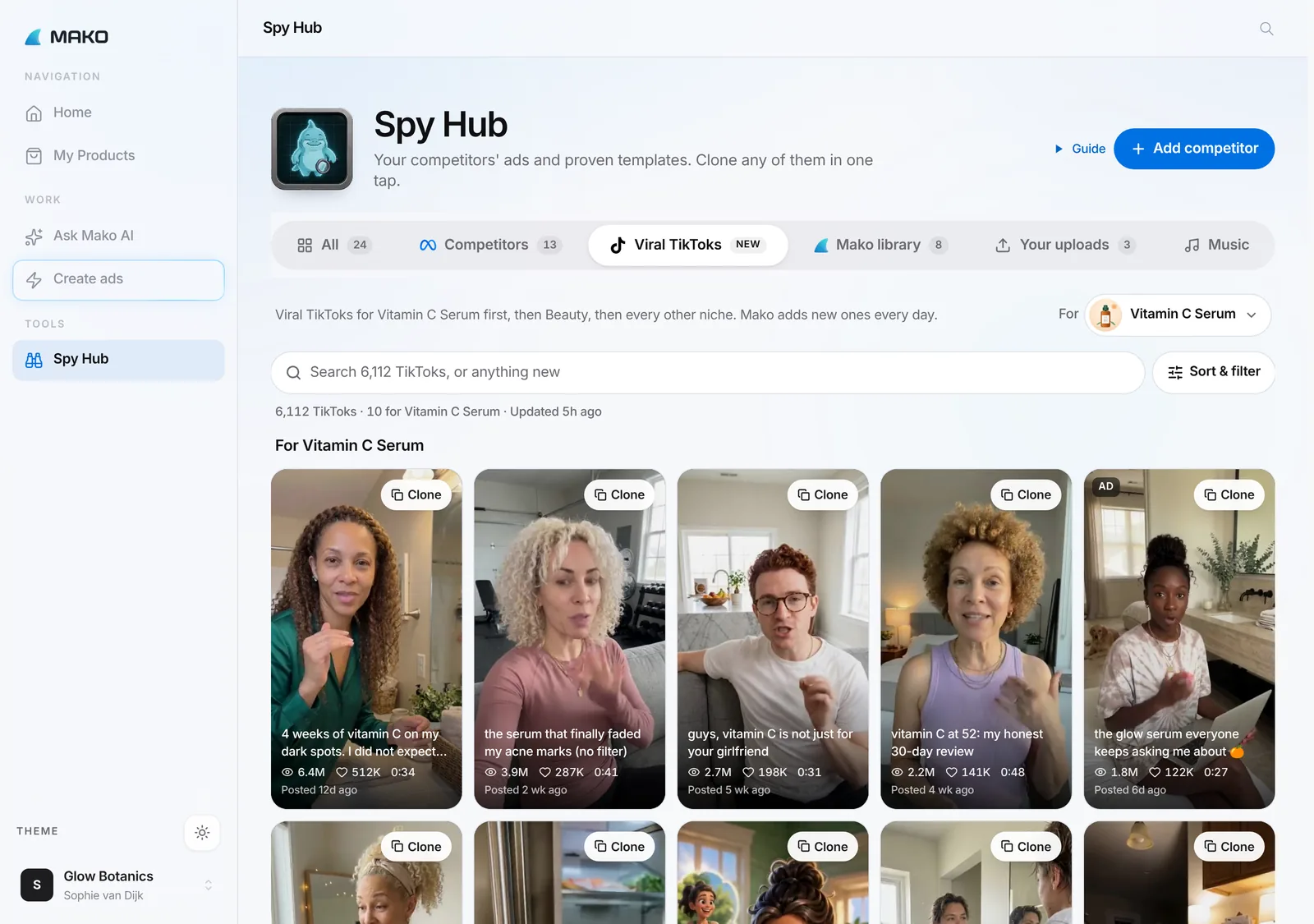
Viral TikToks in Spy Hub

A library of the most-viewed TikToks in all 25 niches, refreshed every day, with views, likes, comments and shares. Open it for a product and Mako searches TikTok for it by itself.

  • Hover to play, then clone any video for your product in one tap
  • Sort by most viewed, most liked or newest, organic or paid
Spy Hub, Viral TikToks: TikToks for Vitamin C Serum first, each with views, likes, length and a Clone button

Spy HubNew

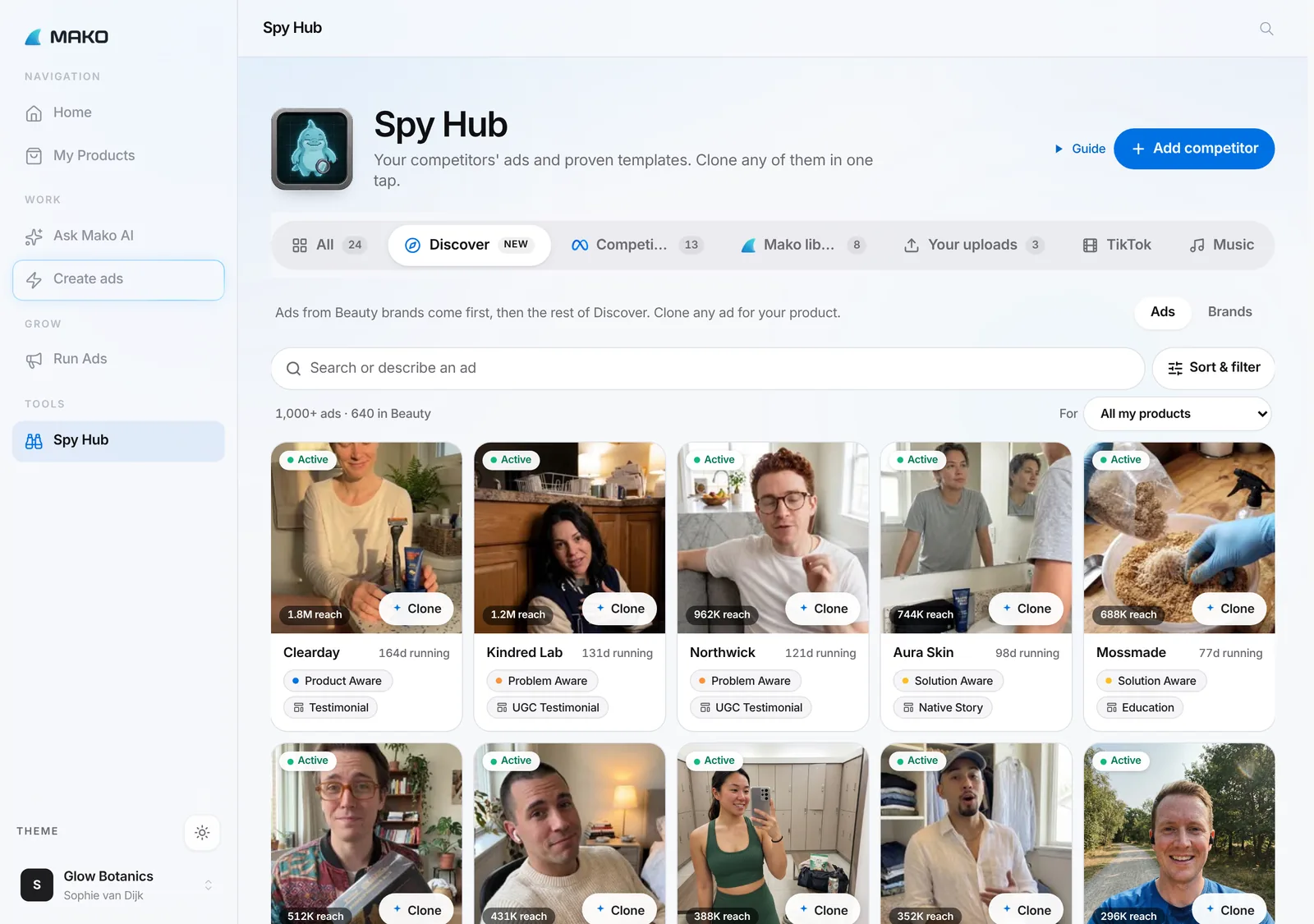
Discover: winning Meta ads from every niche

Browse real Meta ads from brands across Mako, ranked for your niche, and clone any of them in one tap.

  • Your own niches come first, without hiding the rest
  • Switch between ads and brands
The Discover tab in Spy Hub: Meta ads from beauty brands first, each with its reach, days running and a Clone button

VideoNew

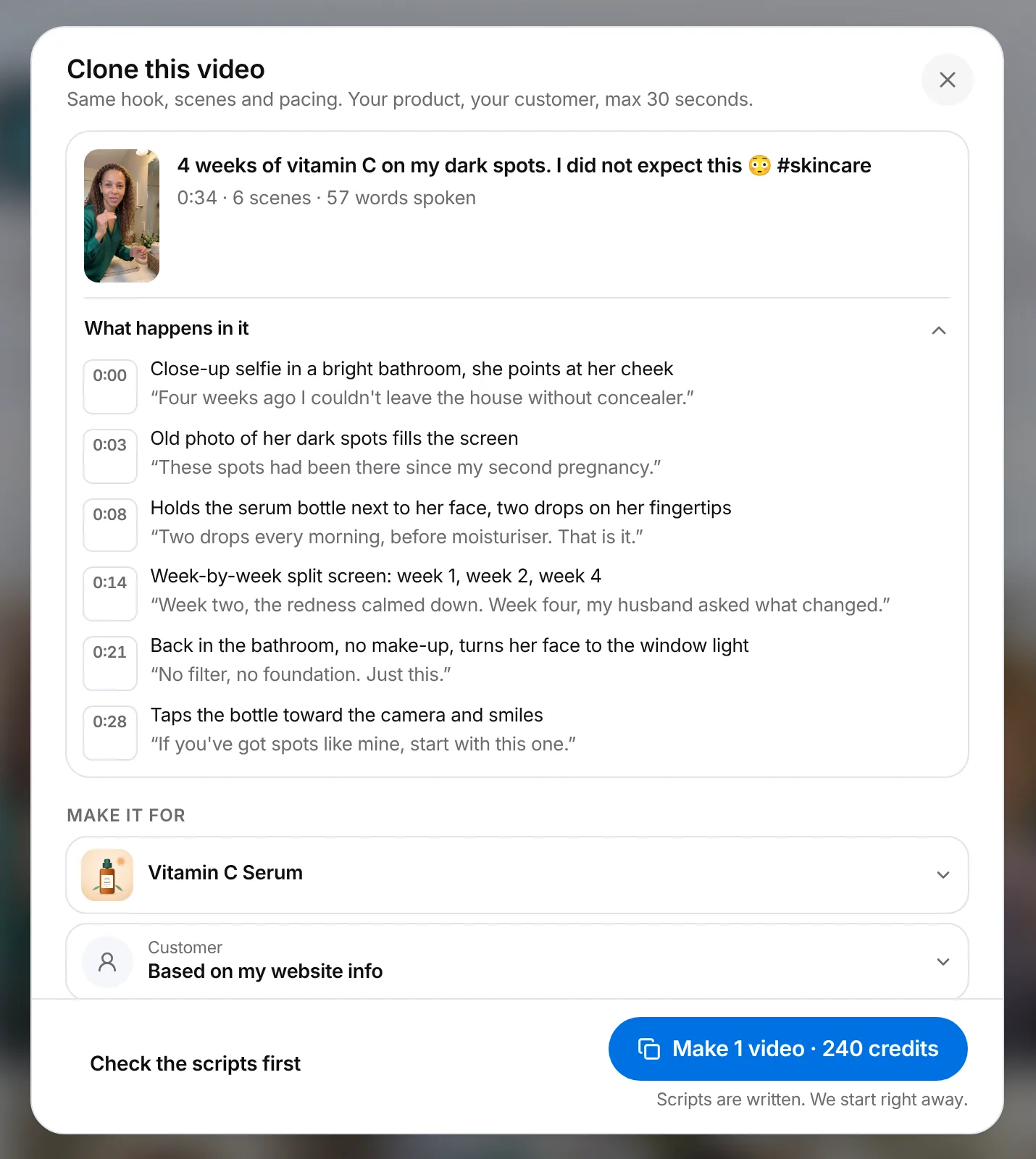
Clone a winning video ad

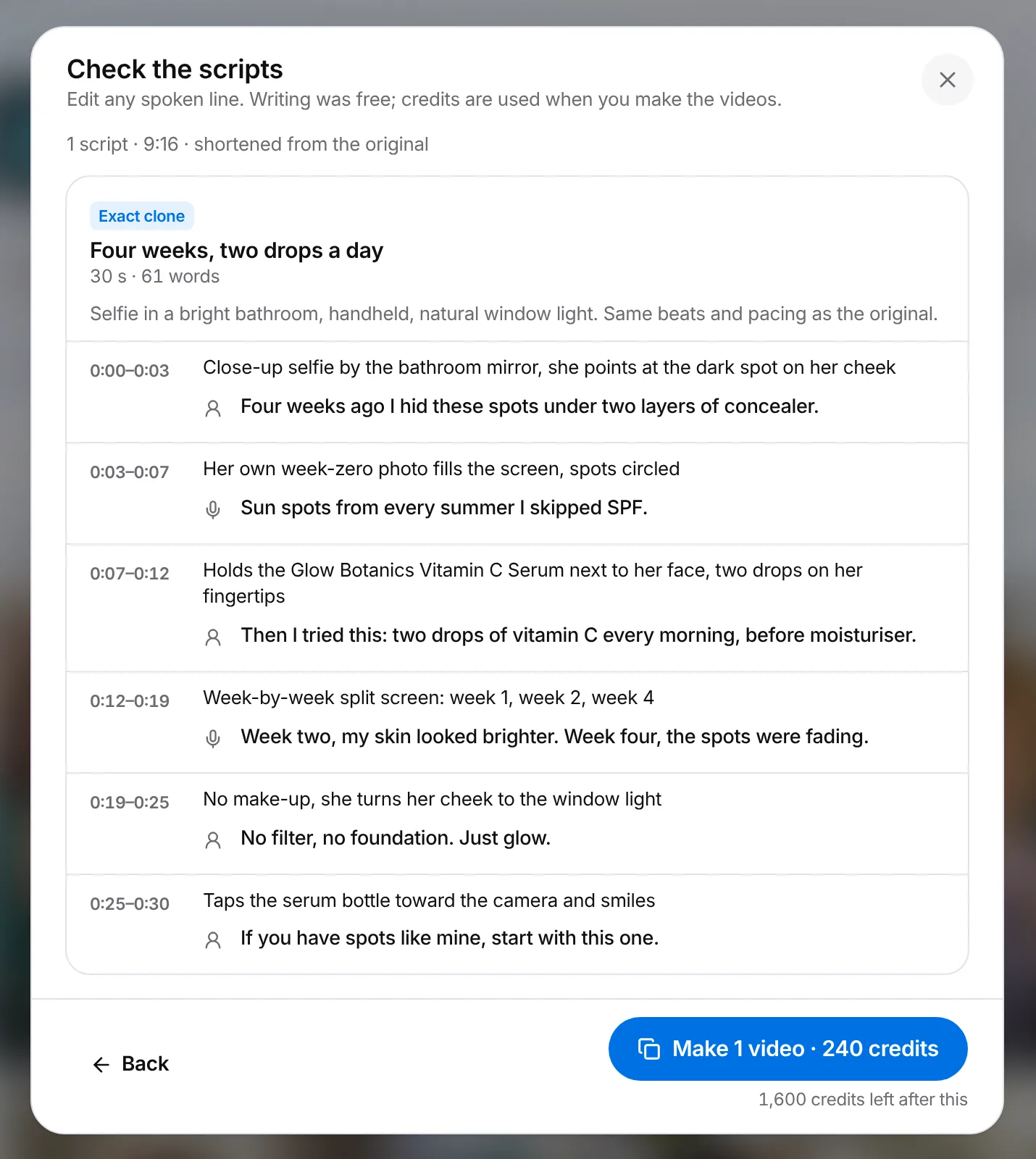
Pick a winning video from Spy Hub, a viral TikTok, your saved ads or a TikTok link. Mako reads it scene by scene and rewrites it beat for beat for your product, in the same order and style.

  • Make an exact clone, a new hook, a different angle or a 15-second cut
  • Check and edit the script first
  • The finished clone sits next to the original, with its views
Clone this video: the original TikTok broken into 6 timed scenes with what is said, made for Vitamin C Serum
Check the scripts: the same 6 beats rewritten for Glow Botanics Vitamin C Serum, ready to edit

VideoBetter

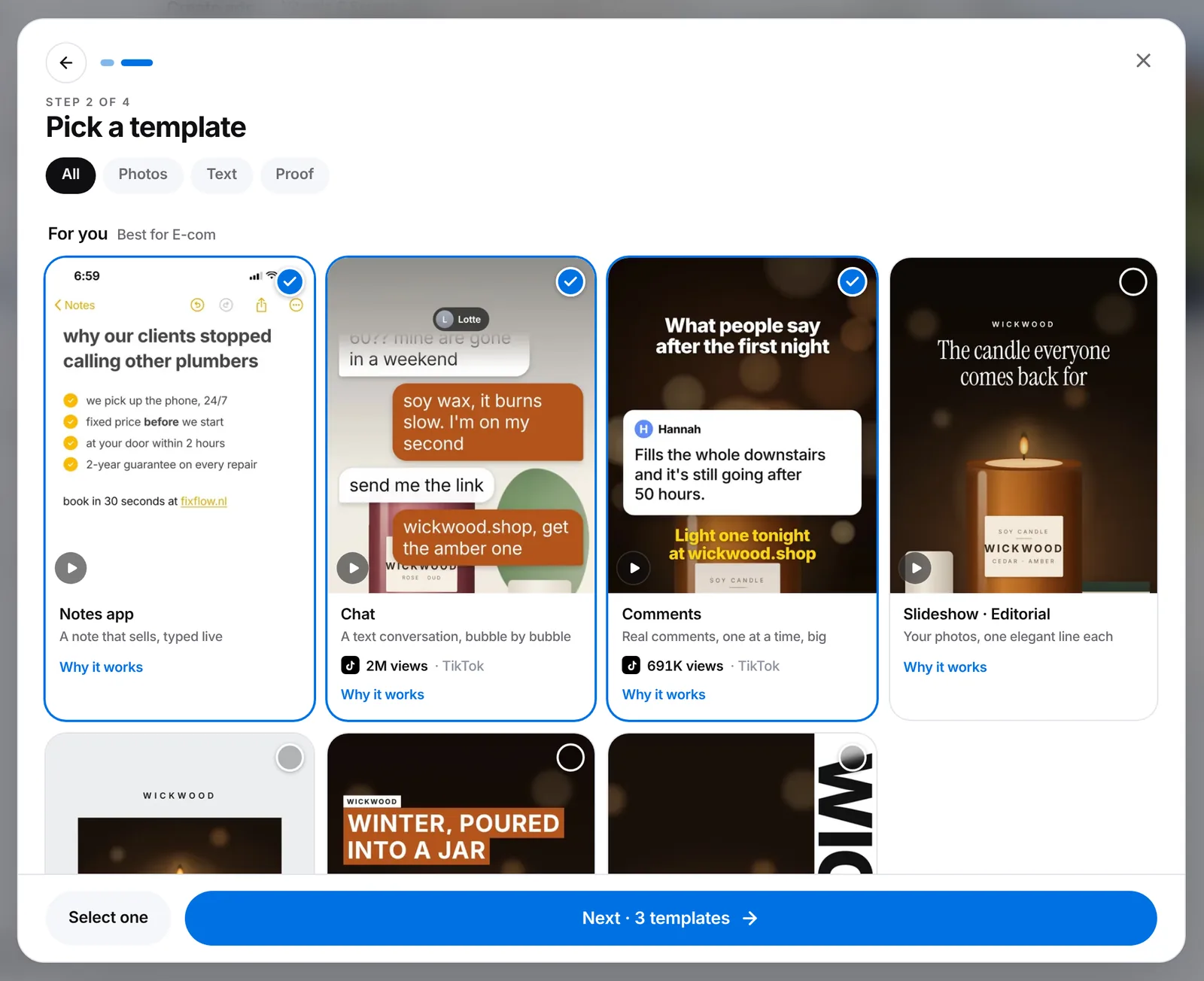
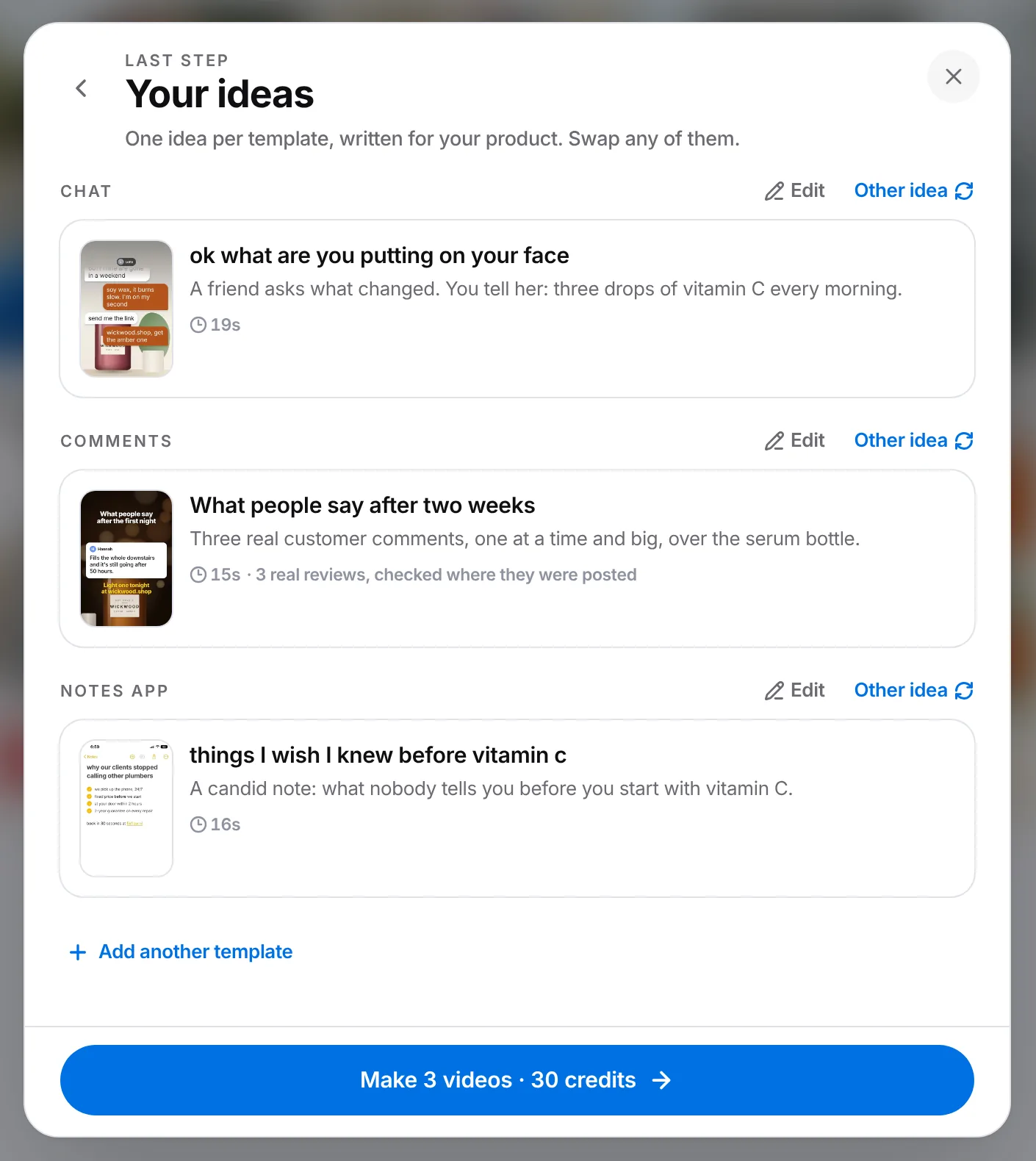
Video Templates: proven formats with your own images and music, for 10 credits

Pick up to 6 phone-screen formats at once, like Notes app, Chat, Comments or a Slideshow, each with proof of how well the original did. Mako writes one idea per template and makes them all in one go.

  • A template video now costs 10 credits, down from 20
  • Use your own photos, Brand Book or logo, and pick the music
  • Comment-style videos use real reviews from your website
Pick a template: Notes app, Chat and Comments picked, with proof like 2M views on TikTok and a Why it works link on every card
Your ideas: one idea per template for Vitamin C Serum, and a Make 3 videos for 30 credits button

VideoNew

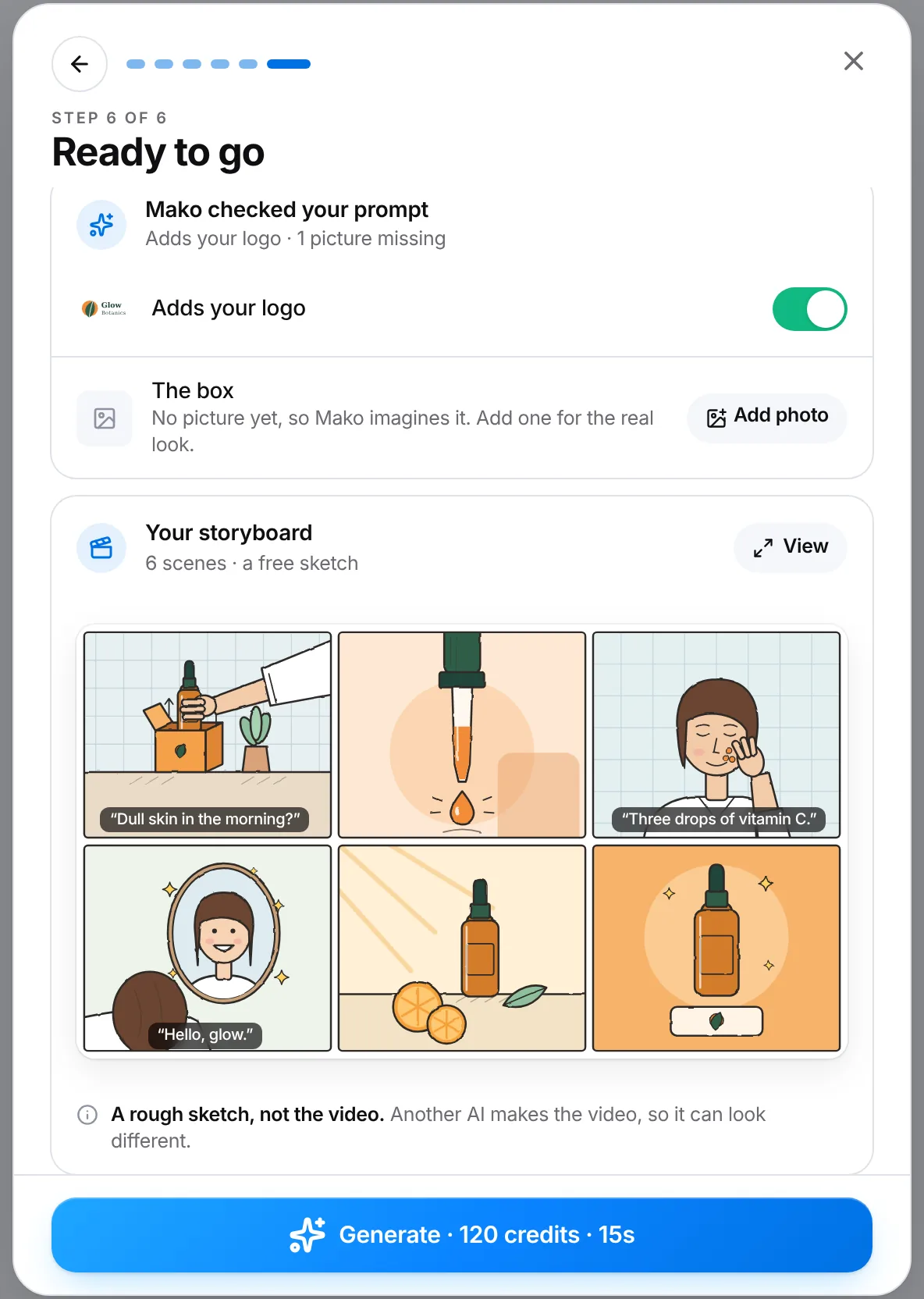
See a free storyboard before you pay for a video

Before you make a custom video, Mako sketches a 6-panel storyboard from your real product photos, with the spoken lines as captions, so you see the plan first. A storyboard never costs credits.

  • Mako checks your prompt against your photos, adds your logo and tells you which picture is still missing
  • You also see it on Ask Mako's approval card and for cloned videos
Ready to go: Mako checked your prompt (adds your logo, one picture missing) and a free 6-scene storyboard sketch with the spoken lines as captions

Getting startedNew

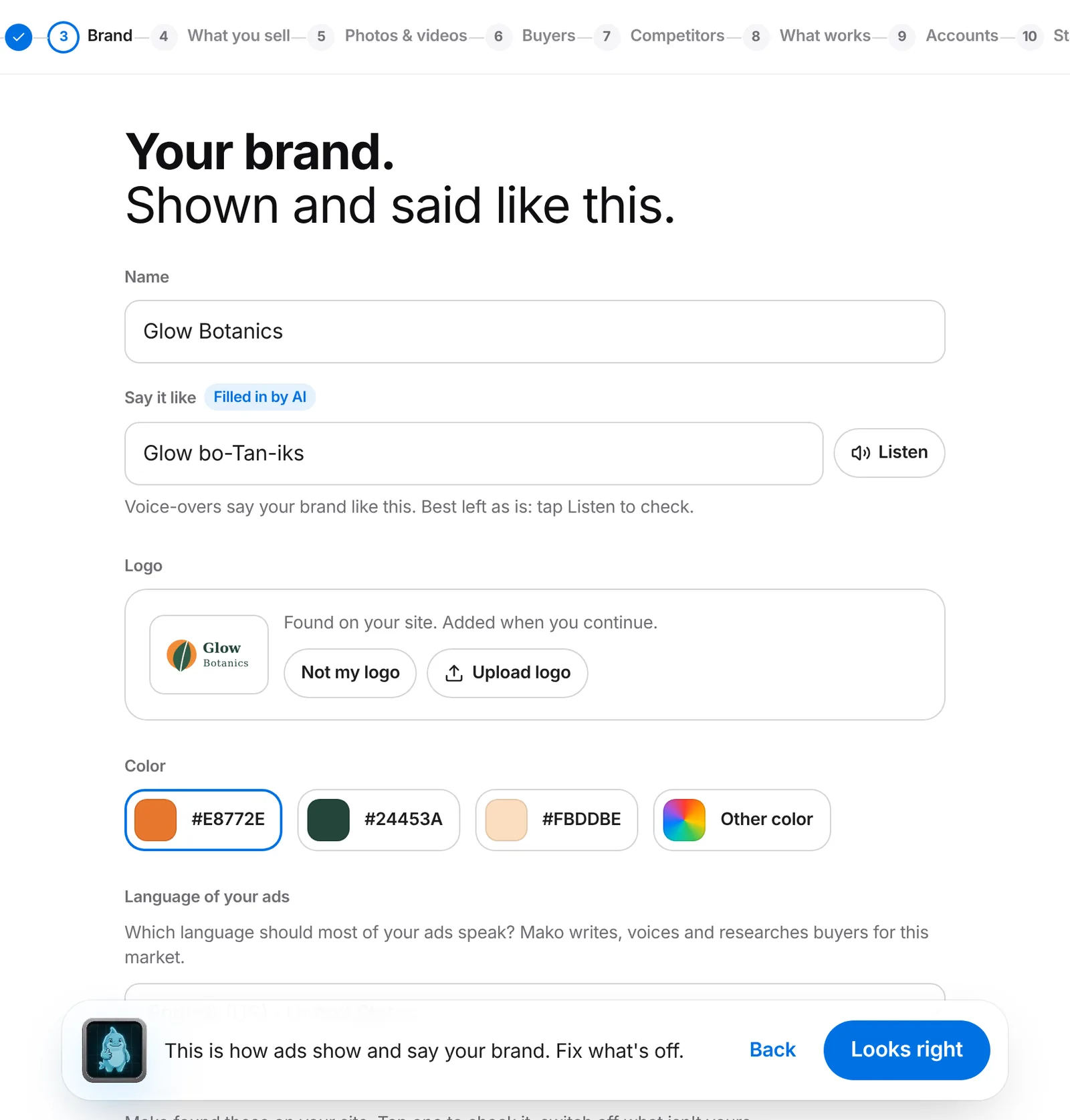
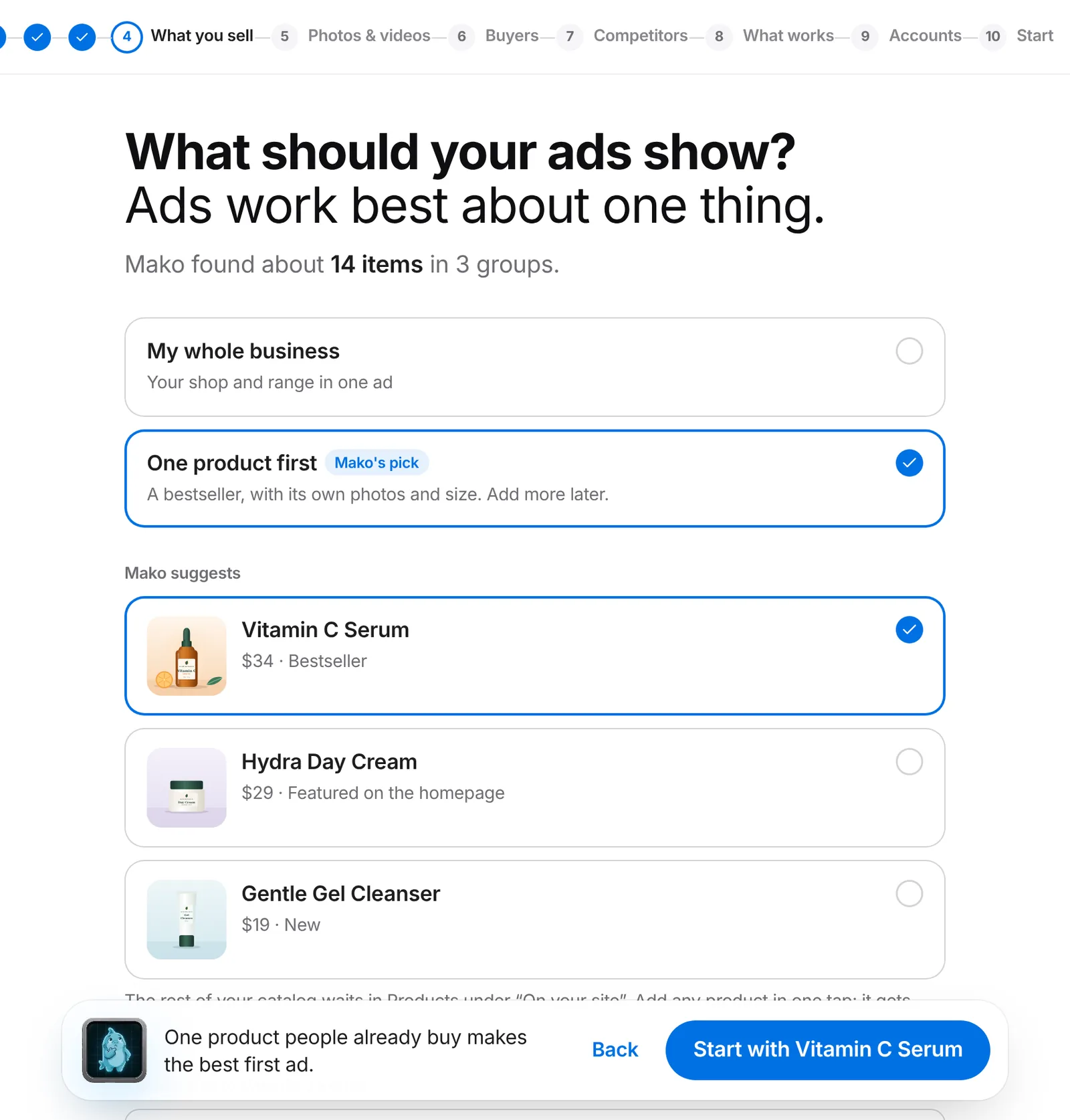
Setup with Mako: your product and brand right before your first ad

What you put in is what you get out. After you sign up, Mako reads your whole website and the web, then shows short screens it already filled in: your brand name and how to say it, logo, colours, products and real sizes, buyers and brands to learn from. Most of the time you just tap "Yes, that's right".

  • Your real product size and one logo go into every image and video
  • Buyer research reads at least 6 sites
  • Pick up where you left off any time; an unfinished setup never blocks you
Setup with Mako: Your brand, shown and said like this, with the name, how to say it, the logo found on the website and the brand colours
Setup with Mako: What should your ads show? One product first, with Vitamin C Serum picked from the products Mako found

VideoNew

Your videos in 30+ languages, at any speed

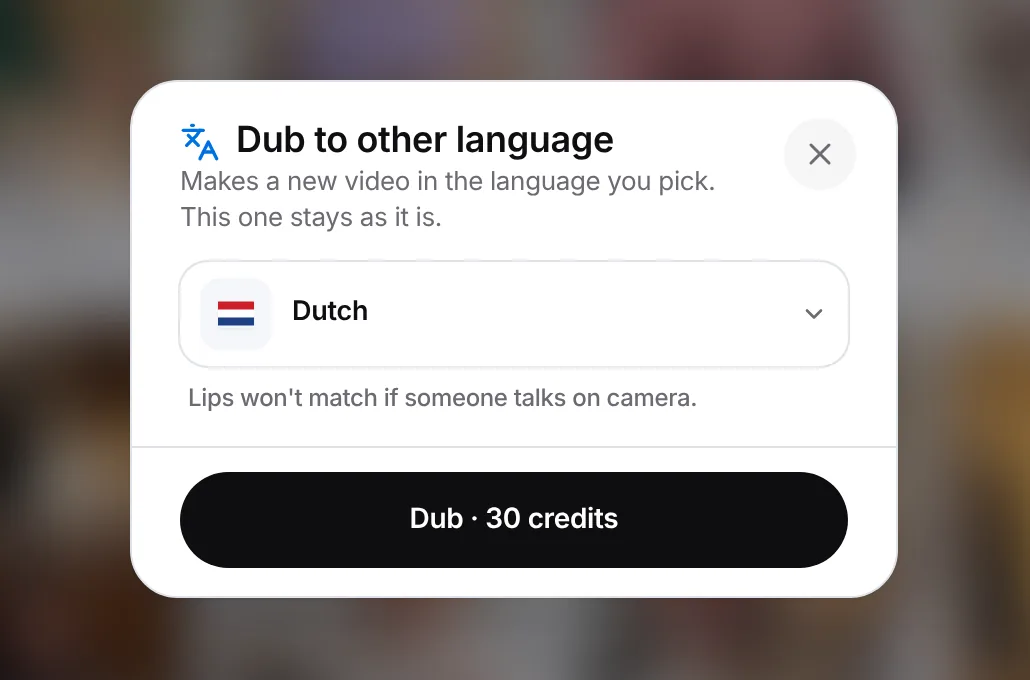
Make a Custom video in another language from the start, or dub a finished video into a new language with a new voice. Your original stays as it is.

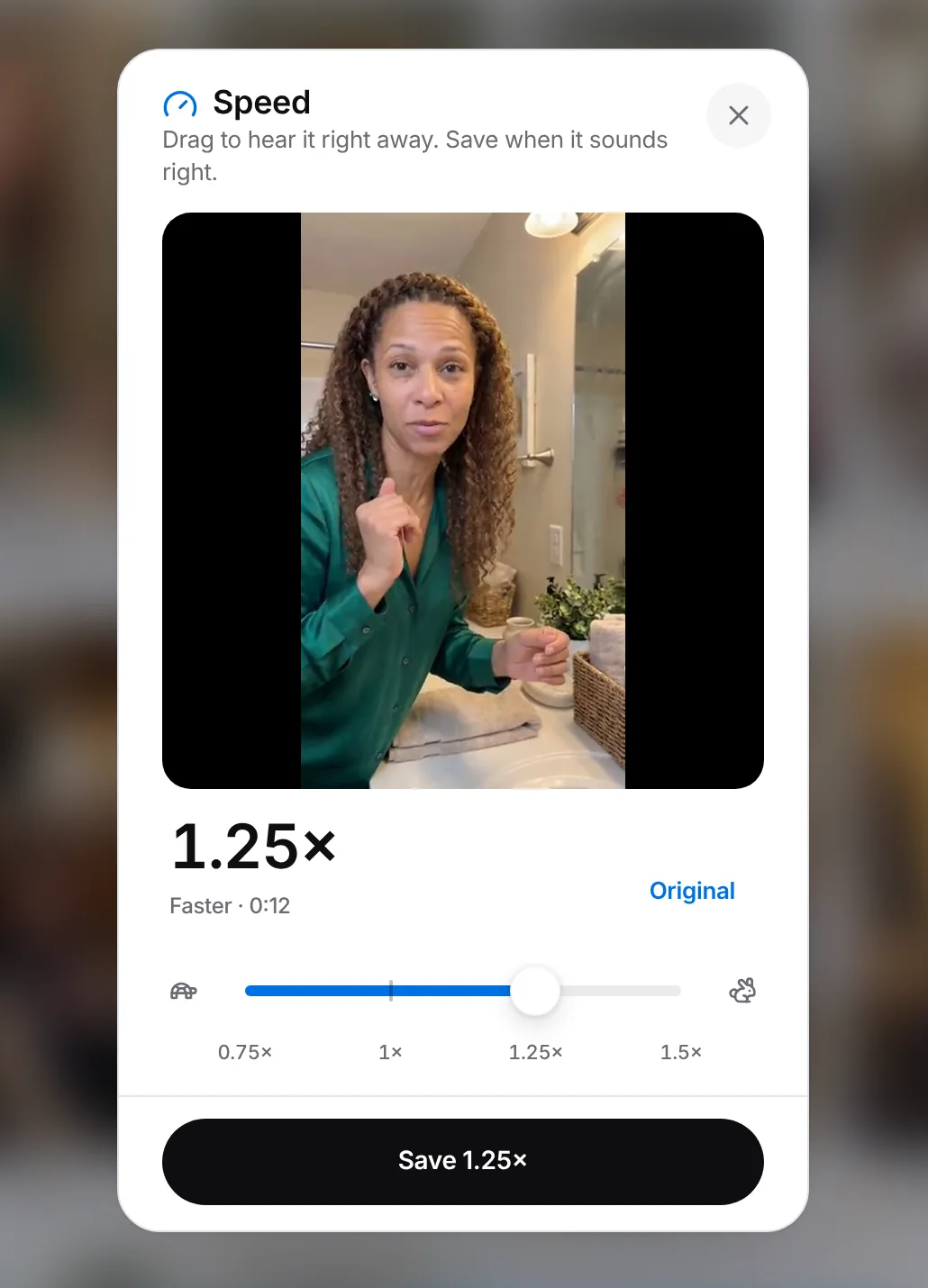
  • Speed control: make any finished video faster or slower with a live preview, and save it for free
Dub to other language: Dutch picked, "Makes a new video in the language you pick. This one stays as it is." and a Dub button with the credit cost
Speed: a live preview of the video at 1.25×, a slider from 0.75× to 1.5× and Save 1.25×

VideoBetter

Subtitles that follow every word

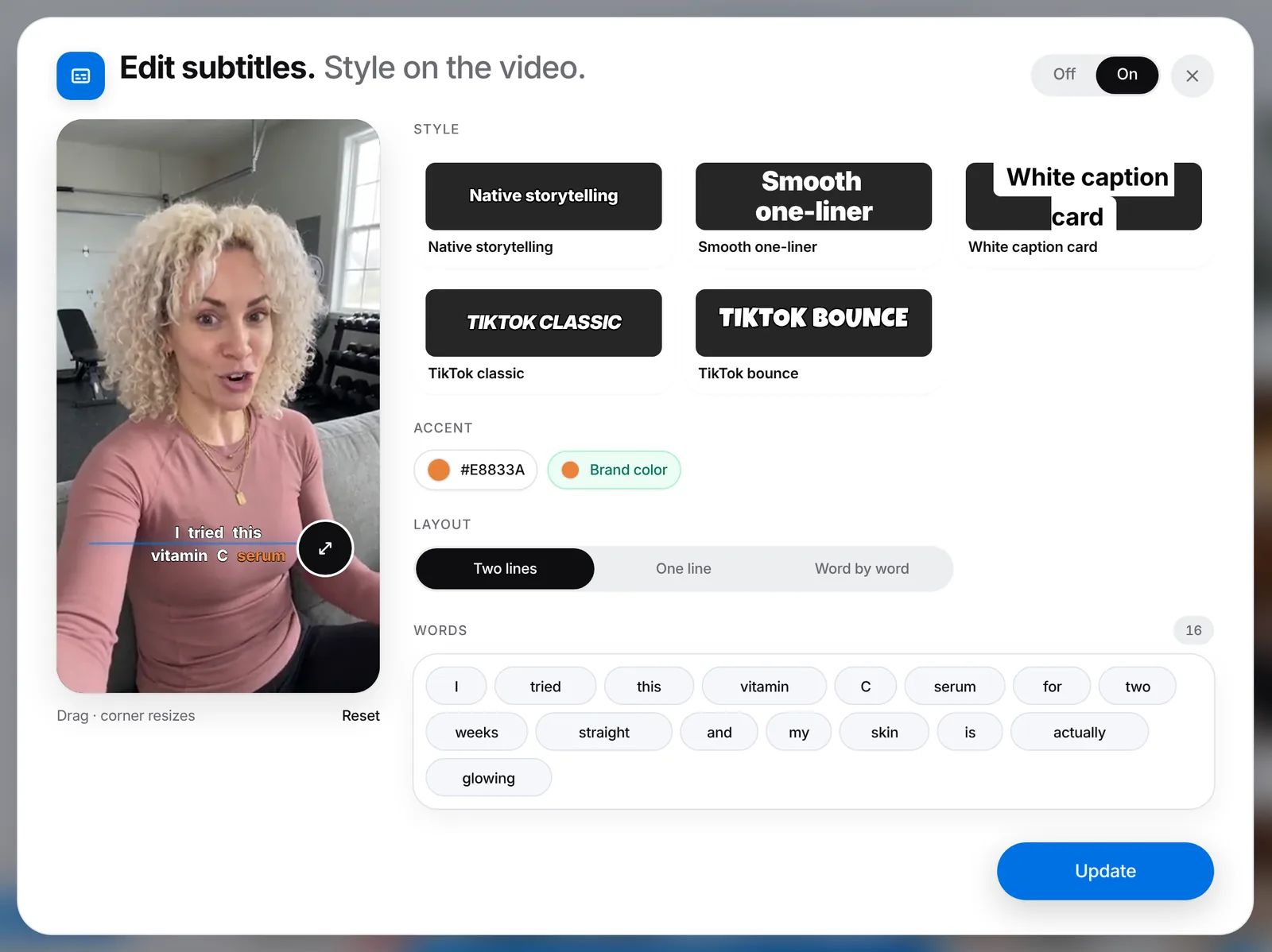
Word-by-word subtitles light up exactly when each word is spoken, follow the language that's really spoken, spell your brand name right and stay readable in your brand color.

  • Words you fix stay fixed, even after a speed change
  • No subtitles in the pauses
Edit subtitles: a video with the spoken word lit in the brand colour, styles, accent colour, layout and the list of words

Create adsNew

Templates that fit your business

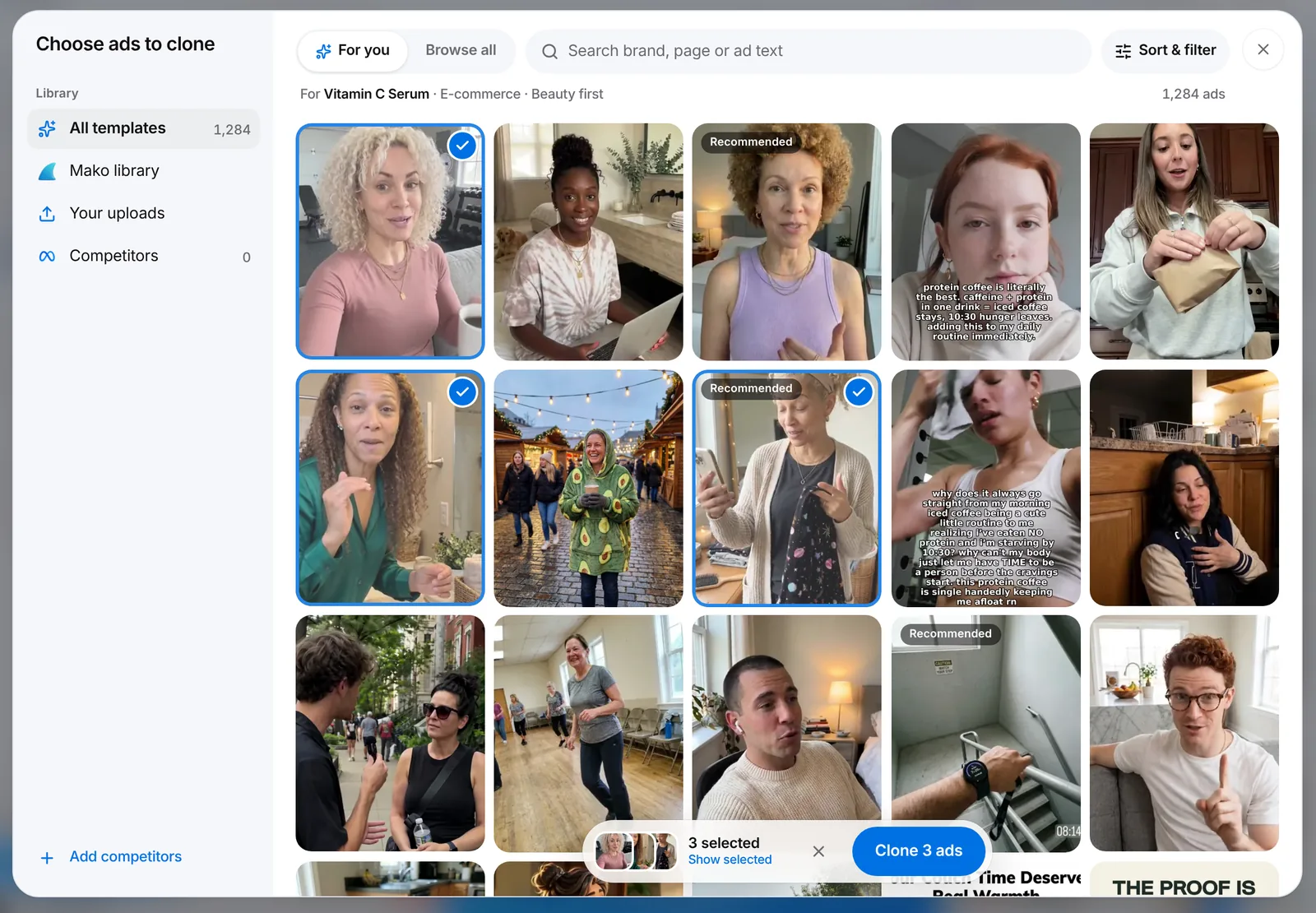
Cloning ads now starts with templates picked for what you sell, in a cleaner picker that always shows the ads you've picked.

Choose ads to clone, For you: templates for Vitamin C Serum, e-commerce, beauty first, with 3 picked and a Clone 3 ads button

Create adsNew

Edit with AI, with your own product photos

In Edit with AI, pick up to 4 references straight from your saved product photos and Brand Book, so the edit looks like your real product.

  • Edit with AI now also works on translated ads
Edit with AI on a cloned ad: the prompt, and references picked from the saved product photos and Brand Book

Create adsBetter

A calmer, cleaner Mako

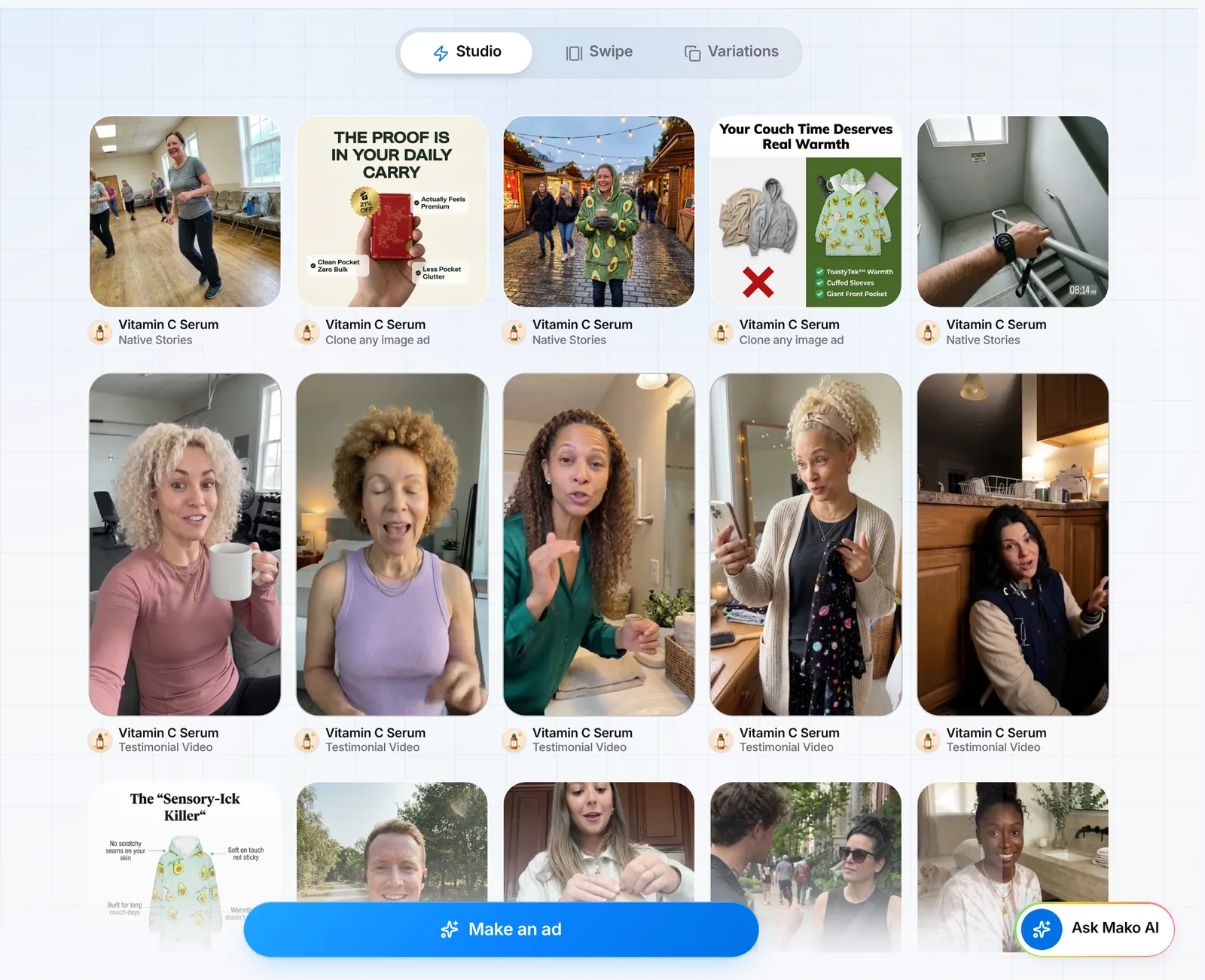
A fresh look across the app, with a Studio · Swipe · Variations switcher at the top of Create ads and one product picker for all three.

Create ads with the Studio, Swipe and Variations switcher on top, a grid of image and video ads, and the Make an ad button

Ask MakoNew

Use Mako inside Claude and ChatGPT

Add Mako in three steps, then ask for ads, check your results and launch campaigns right from that chat.

VideoNew

Edit a video with AI

Pick a part of your video, say what to change, and Mako re-makes just that part as a new version. Switch between versions any time.

Create adsNew

Slideshows

Make up to 20 swipeable photo slideshows at once, edit every word for free, and post them to Instagram, Facebook and TikTok.

My ProductsNew

Watch Mako research your buyers

While Mako studies your market, you see the real web pages it reads, live. When it's done, the research is saved as a report card you can read in full and use in Create ads.

Create adsBetter

Made for your phone

Download saves straight to Photos on iPhone and iPad, selecting works like Photos, and Mako keeps working when you switch apps or lock your screen.

Getting startedBetter

Mako speaks your business, not only webshops

Services, apps and studios now get questions, forms and wording that fit them: a rental company sees bookings, an app sees sign-ups.

My ProductsBetter

Up to 10 photos per product

Save up to 10 photos per product, up from 5. Mako uses all of them when it makes your ads and videos.

Every change. Sorted by impact.

All 425 fixes and improvements since August 7, biggest first in every part of Mako.

Autopilot15 changes

  1. Better

    Autopilot got a big upgrade: it uses Mako's full toolset, makes ads that really differ from its last ones, checks its own ads before reporting, and sticks to your language.

  2. New

    Meet Autopilot: Mako works for you in the background, brings you ideas to approve with one tap, and with Autopilot on makes ads within a monthly budget you set.

  3. Better

    Autopilot now looks at your whole account, and Home shows what it spent today, how long your budget and credits last, what it did and why, and every limit in one place.

  4. New

    One conversation with Mako: what it did on its own, the steps that need your OK and its ideas now show up in your chat, and Mako emails you when something new needs you.

  5. Better

    Autopilot's receipts are honest: a part that failed shows its reason, refunded credits go back into your Autopilot budget, and a task that made nothing pays no work fee.

  6. Better

    Autopilot's cards now say why Mako did something, See them opens exactly the ads that task made, and each step of the week's plan shows the ad Mako means.

  7. Better

    Mako's cards now show the real ad they're about, a Reply link lets you ask or change something before you say yes, and Autopilot no longer asks for OKs it doesn't need.

  8. Better

    Mako's work panel is calmer: every item has the same simple look and at most one main button, and the details open with a tap.

  9. Better

    Mako now asks for what only your business has, like customer quotes, quotes real customers word for word, and its week plan says what to post and how often.

  10. Better

    When Mako gets stuck it now offers its own way out instead of asking you to top up, repeated cards fold into one, and open ideas are checked against today's numbers.

  11. Better

    Autopilot's budget now fits your goal: Mako works out what it costs a month, offers amounts based on your plan, and tells you when it's more than your plan gives.

  12. Better

    Each idea from Mako now comes with the questions you'd ask before saying yes, links to the real campaign, ad or product, and answers in the chat with one tap.

  13. Better

    Mako's emails now spell out each idea: which ad, where and when, why now, the facts to decide on, what happens when you say yes, and the real price.

  14. Fixed

    Idea cards about your ads keep showing the ad's picture instead of a broken image, and video ads show a real frame of the video instead of an empty cover.

  15. Better

    Turn Autopilot on or off right from the Mako chat header, on your computer and on your phone.

The new Mako: simple steps & the Reef7 changes

  1. New

    The simple menu is now the menu for everyone: phones get the same five numbered steps as the computer, a Mako bar that shows if Autopilot is on, and a calmer Home.

  2. New

    Try the Reef: a much simpler, underwater view of Mako that shows your whole journey as one world and always tells you the one next step. Switch back any time.

  3. New

    A simpler menu: Start here, numbered steps from your products to running ads, and every other tool tucked under More tools.

  4. New

    The Reef has one Mako chat box at the bottom: your news, your next step and the chat in one place, with Mako's pick and reasons when it asks you to choose.

  5. Better

    The Reef now opens with your whole account in about 2 seconds, also right after an update, instead of showing an empty account for about 15 seconds.

  6. Fixed

    The Add product form in the Reef no longer blinks and jumps to the top while you type, and a lost 3D view now comes back by itself.

  7. Better

    In the Reef, Research now shows which product it's for and lets you switch it, and Make ads opens on the same product.

Run Ads & Meta ads72 changes

  1. New

    Run Ads now starts with "Let Mako AI set up your campaign": a short chat where you tap or type your answers, Mako fills in the campaign, and you tap Start.

  2. Better

    Manage every campaign from one page in Run Ads: pause or resume, change the daily budget, add new ads, or run an ended campaign again.

  3. New

    Run Ads is here: let Mako run your Facebook and Instagram ads on its own ad account, without connecting your own Meta account.

  4. New

    Let Mako run your Meta ads: pick your ads, goal, audience and daily budget, and Mako runs them, no Meta ad account of your own needed.

  5. New

    Run Ads can now retarget people who already know you on your own ad account with one switch, and adds the Awareness, Engagement and App installs goals.

  6. New

    Let Mako AI set up your campaign is now a real chat: answer a few one-tap questions and Mako builds the whole campaign, down to a city with a radius or a website per ad.

  7. New

    Run Ads can now target cities with a radius, regions and postcodes, not only whole countries, whether Mako runs the ads or you use your own Meta account, and in Ask Mako.

  8. New

    Run Ads now asks what your ads should bring in and picks the goal that fits your business: Bookings, Sign-ups, App users, Sales or Awareness.

  9. New

    Launch up to 70 creatives at once on your own Meta account; Mako splits them into ad sets and divides your budget for you.

  10. New

    See every lead from your Let Mako run it campaigns in one Leads inbox, call or email them in one tap, and export only the new ones.

  11. New

    Turn any single ad on or off with a switch inside Run Ads, both for campaigns Mako runs and on your own Meta account.

  12. Better

    Meta ad setup is calmer: less text, a feed preview that plays your video, a website per ad, and ad copy that no longer costs credits.

  13. New

    Add new ads to a campaign Mako is already running, at no extra charge; they're tested on the same audience and budget.

  14. Better

    Running Meta ads is simpler: one chooser everywhere, one-tap Meta connect, auto-filled campaign names, and the exact video you see in Studio.

  15. New

    Ad copy now writes itself: when you reach the copy step in Run Ads or Post to socials, Mako fills in any missing text and headlines.

  16. New

    Run Ads now shows how your Meta ads are doing right inside Mako: spend, impressions, clicks, reach and conversions.

  17. New

    Meta ads have a new Traffic goal for when you just want more website visitors, plus a short line under each goal saying when to pick it.

  18. New

    See how your Mako-run campaigns perform (money spent, clicks, results and cost per result) and pause, change the budget or cancel any time.

  19. New

    Mako-run lead campaigns now collect name, phone and email, email you each new lead within seconds, and list every lead on the campaign page.

  20. Better

    Run Ads now shows what is going into Meta right now, and when an upload fails, Ask Mako explains what Meta said and, with your OK, puts in only the missing ads.

  21. New

    On your own Meta ad account, you can now target or exclude the custom audiences and lookalikes you built in Meta, and pick one campaign budget or a budget per ad set.

  22. Better

    Campaigns Mako runs for you now carry a spending limit at Meta, so Meta can't spend much more than you paid, and small campaigns no longer stall at $100 after a top-up.

  23. Fixed

    A Sales campaign on your own Meta account now stays a Sales campaign even without a Meta Pixel, and Mako only switches it on once every ad is in.

  24. New

    Every Meta ad Mako creates now tags its clicks for you, so your own website analytics show which ad, ad set and campaign sent each visit. Nothing to set up.

  25. New

    Choose the language of your AI-written ad copy with a small flag button; it starts in your product's own language.

  26. Better

    With Let Mako run it, you're only charged once Meta can build your ads, and your money comes back automatically if Meta refuses.

  27. Better

    If your card fails, campaigns Mako runs for you keep going on the budget you already paid, and fixing your card is one click from the email.

  28. Better

    Run Ads campaigns now show their daily budget, list every ad with a preview, and count results the same way Meta Ads Manager does.

  29. Better

    Big campaigns in Run Ads now show their numbers in seconds, and tapping an ad opens it inside Mako without a Facebook cookie pop-up.

  30. New

    Run Ads and Post to Socials now have their own pages in the menu, on desktop and in the phone tab bar.

  31. Better

    Before you pay for a campaign Mako runs, your ad is now checked with Meta first, so any problem shows on the Review step and nothing is charged.

  32. Better

    Campaigns Mako runs for you are now easy to find again: in Activity, at the top of Integrations, and via a Campaigns button in Studio.

  33. Better

    You can now add or change the card for ads Mako runs right where you pay, on the Review step, and later in the campaign's Money tab.

  34. New

    When you choose Run as Meta ads, you can now pick: let Mako run the ads for you, or run them on your own Meta ad account.

  35. Better

    Running a video as a Meta ad now opens with the ad text already written, next to a live preview of how it will look in the feed.

  36. Better

    Setting up ads Mako runs for you is quicker: age, gender, country, campaign name and website now come pre-filled with recommended answers.

  37. Fixed

    Launching video ads to Meta no longer fails over a missing thumbnail: Mako now uses the thumbnail Meta creates for your video.

  38. New

    A new Money tab on Mako-run campaigns shows every charge and refund, your balance, your next charge and where your money went.

  39. Better

    If Meta rejects your ads, Mako now stops the campaign within about half an hour, refunds what's unspent and tells you why in Meta's words.

  40. Better

    Mako-run campaigns now come with a monthly statement, and a campaign Meta doesn't deliver stops being topped up after 7 days.

  41. Fixed

    Uploads to Meta that got cut off now finish by themselves or end with a Retry button, and a retry never makes a second copy of an ad Meta already has.

  42. Fixed

    Boosted posts on your own Meta account now show a sharp picture in Run Ads and Ask Mako instead of a blurry thumbnail.

  43. Better

    An empty Run Ads page now shows how ads work in three steps, Seen, Tapped and Customer, with your own ad, and both ways to set up a campaign open right where you tap.

  44. New

    Set your own naming pattern for Meta campaigns, ad sets and ads, built from pieces like product, format and size.

  45. Fixed

    A "Let Mako run the ads" launch is no longer stopped right after you pay, and each ad budget charge now sends you one receipt instead of two.

  46. Fixed

    Before a campaign Mako runs launches or resumes, Mako now checks that the page your ads link to opens, so you never pay for clicks into a dead page.

  47. Better

    In Run Ads, Native Story ads now run on their long story with a headline, and "Generate all with AI" fills in missing headlines on any ad.

  48. Fixed

    Cancelling a Let Mako run it campaign now shows the refund you'll actually get after today's ad spend, not your full balance.

  49. Better

    People who tap one of your Let Mako run it ads now land on a page showing that exact ad, not the campaign's first one.

  50. Better

    Leads campaigns run by Mako now show the same lead count everywhere, and each lead is credited to the ad the person came through.

  51. Better

    The 'My Meta account' ad copy step now matches Let Mako run it: text on the left, a live feed preview on the right, and fewer explanation walls.

  52. Better

    After paying to launch with Let Mako run it, you can close right away; Mako emails you when your ads are live, no more waiting on a spinner.

  53. Fixed

    If Meta refuses your Let Mako run it ads, you now see Meta's own reason, and video-only launches are checked before your card is charged.

  54. Better

    Reopening a campaign in Run Ads shows its numbers instantly, and when Meta is busy you see the last known numbers instead of an error.

  55. Fixed

    Reconnecting Meta no longer shows a false 'Meta did not stay connected' error when the connection actually worked.

  56. Fixed

    Ad videos now play inside Run Ads, every ad row opens when tapped, and Post to socials shows real thumbnails and profile pictures again.

  57. Fixed

    If your Meta connection has expired, Run Ads and Integrations now tell you and offer a Reconnect Meta button instead of a vague error.

  58. Fixed

    Letting Mako run your ads is smoother: your Studio creatives show up, the payment step stays open, and drafts can be resumed or discarded.

  59. Better

    Traffic campaigns Mako runs now aim for people who actually reach your page, not just quick taps, and report landing page views.

  60. Fixed

    Meta ads with several text options are no longer refused by Meta at launch.

  61. Better

    Run as Meta ads now shows the website link your ads will send people to, and fills in ad text you already wrote in Create ads.

  62. Better

    Adding extra headlines or ad texts no longer blocks the Leads goal, and Mako remembers your Page, Instagram account and button per ad account.

  63. Fixed

    If Meta pauses your ad account, Mako now says so plainly and gives you a button to open Ads Manager and confirm it.

  64. Better

    Run as Meta ads now remembers your Facebook Page and Instagram account, and 'Generate with AI' writes copy about the right product.

  65. Better

    When Mako runs your ads, you can add a card right in the setup, pick the button text on your ad, and your lead form names your business.

  66. Fixed

    In Run Ads, backing out of Connect Meta no longer hides the choice between letting Mako run the ads and using your own Meta account.

  67. Fixed

    On the Ad copy step, Use for all now also copies the website to every selected ad, so you don't have to fill it in again and again.

  68. Better

    "Run as Meta ads" in the Studio menu now always lets you choose between Let Mako run it and your own Meta account.

  69. Fixed

    Pages you open from the menu now start at the top instead of halfway down, and Run Ads and Post to socials get proper space under the header.

  70. Fixed

    Starting a new Let Mako run it campaign no longer pre-ticks a creative you didn't choose.

  71. Fixed

    Running ads in the EU no longer wrongly says 'Meta has no approved advertiser' and blocks Launch after you re-pick your ad account.

  72. Fixed

    On a campaign that needs attention, Cancel & refund now opens the refund screen right away, and the time shown is when the problem started.

Ask Mako, also in Claude and ChatGPT46 changes

  1. New

    Mako now remembers your brand's voice and your feedback, like "never white backgrounds": approve a rule once and every new ad, script and idea follows it.

  2. New

    Run Meta ads and post to Facebook or Instagram straight from Ask Mako: it fills in the details and shows one clear card with the cost first.

  3. New

    Ask Mako now does the work: it plans and launches ads and videos, and asks your OK before spending credits.

  4. New

    In Claude and ChatGPT, Mako now answers with picture-first cards: your ads and products, videos to play, your Meta results and plans you approve in one tap.

  5. New

    Mako now remembers what it learns from your chats and star ratings, uses it in every chat and new ad, and shows each note on your product page, where you can remove it.

  6. Better

    Ask Mako now thinks like your own marketer: it writes full scripts itself, suggests more buyer research when needed, and a You decide button lets Mako pick for you.

  7. New

    Ask Mako can now find any of your Meta ad accounts by name, compare your ads over any period, and watch a video ad to explain why it works.

  8. New

    Ask Mako can turn your best Facebook and Instagram ads into new image or video variations, including carousels and boosted posts.

  9. New

    Ask Mako can now check, pause, resume, re-budget, cancel and launch campaigns Mako runs for you, and always asks first when money is involved.

  10. New

    Ask Mako can now launch your Meta ads and schedule social posts: it drafts a plan, asks only what's missing, then waits for you to tap Allow.

  11. Better

    Claude and ChatGPT can now put paused ads into any Meta ad account your workspace has linked, and only you can let them switch ads on, per campaign in Mako.

  12. New

    When Mako needs a choice or a fact from you, it now asks on tap-to-answer cards, one question at a time, with its own pick first and a one-line reason.

  13. New

    Claude and ChatGPT can now put carousel ads in your Meta account, the slides of a slideshow as one swipeable ad, switched off until you switch it on in Mako.

  14. New

    In Claude and ChatGPT, Mako can now make a single voice-over, image, short clip or cut-out, and read whole posts from YouTube, Instagram, TikTok, X, LinkedIn and more.

  15. Better

    Mako can now make new hooks for a video ad from your own Meta account, and when Meta holds back the video file, it tells you the one step that unlocks it.

  16. Better

    Choose how many credits a connected AI app, such as Claude and ChatGPT, may use per day, from 100 to 10,000, and refunded jobs no longer count toward that limit.

  17. Better

    Ads you made in Claude and ChatGPT now wait at the top of Home, ready to check and switch on, and Use Mako in Claude and ChatGPT opens from every page, the Reef included.

  18. Fixed

    Fixed the problems you reported in Ask Mako: stuck or failing videos, credits charged for nothing, products that seemed to vanish, and a typed "yes" counted as "no".

  19. New

    Ask Mako can now edit an image for you: just say in the chat what to change, the same way as in Edit with AI.

  20. Better

    Ask Mako now does the homework first: it looks at your setup, buyer research, past ads, Spy Hub and the web, then comes back with one plan you can start in one tap.

  21. Better

    Ask Mako keeps replies short unless you ask for more, tells you once when a video would need a photo it doesn't have, and photos you send for a video really go into it.

  22. New

    Type while Mako is working: it reads your message at its next step, and Send now makes it stop and read your message right away.

  23. Fixed

    On iPhone, locking the screen or switching apps while Ask Mako works no longer shows "Load failed"; the reply is waiting when you come back.

    iPhone
  24. Better

    Ask Mako now gives real ad counts, never asks you to approve something that would fail, and its approval cards show what they'll make.

  25. Better

    In Ask Mako, tap any ad in the gallery to watch it, missing headlines are written for you, and 'View your campaign' follows each launch.

  26. Better

    Ask Mako can now pause or resume a single ad, add ads to your campaign, and post to your linked Instagram and Facebook after you tap Allow.

  27. Fixed

    Ask Mako no longer stops replying in the middle of a sentence; if a reply does get cut off, it says so and you can tap Continue.

  28. Better

    When Mako runs your ads, Ask Mako now recommends the Sales goal to anyone who sells something, also when people buy on Amazon or another site.

  29. Better

    Ask Mako can now stop tracking a competitor (it asks first), find and link your earlier chats, and make the whole video idea it picked.

  30. Fixed

    Ask Mako now reads the PDFs you attach, instead of saying the file is no longer available.

  31. Better

    Your daily credit limit for Claude and ChatGPT now stays when you reconnect, you can set it before connecting, and Mako links you straight to raise it.

  32. Fixed

    The Ads from your AI apps card now shows what Meta really runs: live ads show as live, and ads a cut-off upload missed go in with one button.

  33. Better

    Mako's cards in the Ask Mako chat are calmer: one row each with one main button, and a tap opens the rest right there.

  34. Fixed

    Mako no longer says it can't run or post your ads when it can: it checks what it's able to do before it ever says no.

  35. Fixed

    An Ask Mako chat no longer stops answering after Mako read a web page, and chats that got stuck this way work again.

  36. Better

    Every Ask Mako answer now ends with three one-tap next steps written for that answer, with You decide first when Mako asks you to choose.

  37. Better

    Ask Mako's replies now flow in at a readable pace, and the start of each answer stays in view instead of scrolling past.

  38. Better

    Videos from Ask Mako scripts now follow a timed shot plan built on your real product photos. Your own script is shown polished first, or kept word for word.

  39. Fixed

    Attaching an SVG logo, an iPhone photo or lots of large photos no longer breaks an Ask Mako chat; Mako now sees them and answers.

  40. Fixed

    Asking Ask Mako for Testimonial video ideas now works instead of failing with 'Couldn't write ideas just now'.

  41. New

    Scrolled up in Ask Mako while it's still replying? A 'new messages' button now lets you jump straight to the latest.

  42. Fixed

    Ask Mako no longer gets stuck on the old chat screen after you sign in, or when you use Safari or strict privacy settings.

  43. Fixed

    Running out of credits inside Ask Mako now shows upgrade and buy-credits options instead of an empty popup.

  44. Fixed

    On your phone, tapping a link in an Ask Mako reply now tucks the chat away so you actually see the page it opens.

    Phone
  45. Fixed

    Tapping Open your new ads in Ask Mako now always shows the new ad, also when Create ads is already open next to the chat.

  46. Better

    Hiding the Ask Mako panel is clearer: one simple arrow in the top bar closes it, and the extra plus button is gone.

Post to socials & Integrations23 changes

  1. New

    Use Mako in Claude and ChatGPT: add Mako in three steps, then ask for ads, check results and launch campaigns right from that chat.

  2. New

    Connect your TikTok profile and post or schedule videos straight from Post to socials.

  3. New

    Grow Accounts: launch, warm up and post to real local TikTok and Instagram growth accounts through TokPortal, right from Mako, with the exact price shown before you buy.

  4. New

    Edit, reschedule, retry or remove any post in Post to socials, and see everything you've planned in a new calendar view.

  5. Better

    Integrations now lists every connected account with its status, and tells you when one needs reconnecting or is missing a permission.

  6. New

    See how your posts are doing in one Results view for Instagram, Facebook and TikTok: followers, likes, comments, views and a chart.

  7. New

    Post a video to Instagram as a trial reel that non-followers see first, so a video that flops never reaches your followers, and see its views and reach in Mako.

  8. Fixed

    Post to socials is more reliable: a stuck post can be cancelled or retried, ads default to the right Facebook Page, reconnects stick, and connection status is honest.

  9. Better

    Captions in Post to socials are now free, and "Generate all with AI" writes copy for all your creatives at once instead of three at a time.

  10. Better

    Results in Post to socials now load instantly, let you pick a single account, and no longer show a "Reconnect" row for every Facebook Page.

  11. Better

    Post to socials now opens on your own posts, with separate Socials and Meta Ads tabs and an 'Open on Instagram/Facebook' link per post.

  12. Better

    Post to socials now sits in the Create ads header, lists every Instagram account and Facebook Page you connect, and no longer crashes on Publish.

  13. Fixed

    Adding posts to your Grow Accounts works again, scheduling no longer times out or posts a video twice, and you can set a daily budget your AI apps may spend without asking.

  14. Fixed

    Connecting Instagram now finds Facebook Pages kept in a Business portfolio, without connecting your Facebook Page or Meta ads first.

  15. Better

    If Instagram won't connect, Mako now tells you which of three problems it is and what to do, and the Help FAQ explains the step people miss in Facebook's window.

  16. Better

    Once your captions are written, 'Rewrite all with AI' stays available in Post to socials and asks before replacing your text.

  17. Better

    Posting to TikTok is simpler: one 'Who can see this?' dropdown, extra options tucked away, and a clear note if your account must be private.

  18. New

    See your TikTok followers, likes and per-video views in Post to socials, and ask Ask Mako what works on your TikTok.

  19. Better

    Tapping Post to Instagram or Facebook now starts with that account picked, new posts appear in your list right away, and thumbnails load faster.

  20. Better

    Post to socials now counts every post correctly (6 ads on 2 channels = 12 posts) and lets you set a different time for each post.

  21. Fixed

    'Generate with AI' in Post to socials now writes your caption, and you can upload your own files or pick from your outputs with clear previews.

  22. Better

    If a post fails because a connection expired, tap Reconnect on that post in Activity and Mako retries the same post automatically.

  23. Fixed

    TikTok posts no longer fail while Mako's TikTok app is still in review: they go out as "Only me", which is now picked for you.

Create ads82 changes

  1. Better

    Clone any image ad now works out why the original works and rebuilds that idea for your brand from real facts only: no borrowed mascots, made-up offers or invented customers.

  2. Better

    Create Variations now plans every variation for you: Mako says what made your winner work and shows the new words or new pictures as a plan before you spend a credit.

  3. New

    Add text and hooks: put hook text and word-by-word captions on any video or photo, let AI write a few hooks, and export each one as its own ad, for free.

  4. New

    Edit with AI is now a real image editor: click any text to retype it, drag things to move them, replace or remove a part, or describe the change in one sentence.

  5. New

    New: Slideshows. Make up to 20 swipeable photo slideshows at once, edit every word for free, and post them to Instagram, Facebook and TikTok.

  6. Better

    The people in your image ads and Custom videos now come from your buyer persona: striking, real-looking people who fit your audience, not the same stock faces in every ad.

  7. New

    Edit with AI on images: click the parts you want changed, add a note to each, and send them all as one edit. The Edit with AI button is now easy to spot, too.

  8. New

    Clone an ad in the sizes you need: pick up to 3 sizes at once in Studio, Spy Hub, Swipe and Ask Mako, see the price first, and get each image at exactly that size.

  9. Better

    Picking ads to clone now starts with templates that fit your business, in a cleaner picker that always shows the ads you've picked.

  10. New

    On iPhone and iPad, Download now saves your videos and images straight to Photos instead of the Files app.

    iPhone
  11. Better

    A fresh look across Mako, plus a Studio · Swipe · Variations switcher at the top of Create ads with one product picker for all three.

  12. Fixed

    On phones and tablets, 24 buttons that only showed up on mouse-hover, like delete, remove and Edit with AI, are now always there to tap.

    Phone
  13. New

    Let others pick the winner: share 2 to 6 of your ads or videos on a vote page that shows them as real feed posts, and see every vote in Mako.

  14. Fixed

    Cloned ads keep your product's real shape instead of stretching it, keep your own rules word for word, and keep your product or logo out of ads meant to show none.

  15. Better

    People in your image ads now look like ordinary phone photos of real people instead of a catalog shoot, at the same cost per image.

  16. Better

    Edit with AI opens about twice as fast, marks the right spot when you ask for a change, and tells you plainly when a change didn't apply, without charging you.

  17. Better

    Recreated ads now name your product where the original named theirs, read as one speaker, and follow your Creative Direction for both the words and the picture.

  18. Better

    After the 5 free AI edits on an image, keep editing for 15 credits per edit instead of being locked out; if an edit fails, the credits come back.

  19. Fixed

    Cloned and recreated ads no longer lose heads, logos or the bottom of the design at the edges when Mako fits them to the size you picked.

  20. Fixed

    "Already generating this one" no longer stops you from making an image or video again: anything you start on purpose gets made, only a double-click is caught.

  21. Better

    Ads of a deleted product now show up in Create Variations, and you can bring a deleted product back with the new Restore product button.

  22. Better

    Add up to 10 reference images in Create any image and Edit with AI, drag them in, set their order and point at one in your note: "use the jacket from reference 3".

  23. New

    Create ads has a new All, Images and Videos filter that covers your whole history, and scrolling a long history no longer skips any ads.

  24. Better

    Let Mako pick now chooses ads to clone from your own uploads and your competitors' proven ads first, then your niche, explains each pick, and skips templates you've used.

  25. Better

    Native Story ads get candid, scroll-stopping photos where nobody poses with the product, and a story that tells what the photo can't show instead of describing it.

  26. New

    In Edit with AI, pick up to 4 reference images straight from your saved product photos and Brand Book.

  27. Better

    If your phone locks or you switch apps while Mako is working, the action now finishes when you come back, without errors or double charges.

    Phone
  28. Better

    Select mode in Create ads works like Photos: a Save button on phones, and on desktop and iPad the top bar turns into the selection toolbar.

  29. Better

    Create ads has a new Quality choice (Good, Excellent or Extreme) with the credit cost shown for each.

  30. Better

    Ideas for you in Custom video is easier to use: tap an idea to select it, then press Continue, so you never start one by accident.

  31. Better

    Selecting ads on your iPhone now works like Photos: Cancel and Select All at the top, Post and Ads buttons at the bottom.

    iPhone
  32. Better

    Create ads feels smoother: swipe between ads in the full-screen viewer, swipe down to close, and undo a deleted ad within 10 seconds.

  33. Fixed

    Cloned and custom image ads no longer get small grey-white specks next to the text on dark designs.

  34. Better

    Before you clone an ad, Ad intelligence now shows the whole ad at its own shape, and a click opens it full size.

  35. Fixed

    Create Your Own Image now always shows your real product label, even when no picture is attached, because Mako adds your product photos and Brand Book itself.

  36. Fixed

    An ad no longer fails because one Brand Book or product file has gone missing, and an image cut off midway now gives your credits back instead of spinning forever.

  37. Fixed

    When an image ad can't be made, you now see that within minutes instead of waiting half an hour or more, and ads that are just slow still retry by themselves.

  38. Fixed

    Ads for printed products like t-shirts, mugs and posters now copy the real print from your photo, instead of typing your slogan onto a blank product.

  39. Better

    Native story ads and photo-style cloned ads look cleaner: no more grainy texture or blotchy skin.

  40. Better

    Every Create ads flow now has a Back arrow on its first step (Esc works too) that returns to "What do you want to make?" and keeps the product you picked.

  41. Better

    While Create ads loads, the placeholder tiles no longer look like real ads, and an account with no ads yet opens straight on "What do you want to make?".

  42. Fixed

    An ad you remove in Create ads now stays removed after a reload or in another tab, and Undo always brings back everything it says.

  43. Better

    Recreate a winning ad now designs your image from the original winning template, and the long ad story is written when you open the ad text, to fit the finished ad.

  44. Fixed

    The long story text under your image ads no longer stops mid-sentence, and it can now run past 10,000 characters.

  45. Fixed

    Fixed a problem where every image batch in Studio failed with an error; images, retries and Native Stories render normally again.

  46. Fixed

    "Edit with AI" now works on translated ads, and the edited version replaces the translated one.

  47. Fixed

    Your ads in Create ads now appear in the order they were made, and tiles no longer jump around while ads generate or load.

  48. Fixed

    Translated ads now keep the original shape (a 9:16 story stays 9:16) instead of always coming back as a square.

  49. Fixed

    A cancelled image generation now stays cancelled instead of coming back a few seconds later, and your credits are returned once.

  50. Fixed

    On phones, tapping Generate no longer slides the Create ads page up and hides the Studio switcher and the Make an ad button.

    Phone
  51. Fixed

    Images no longer hang at 96% or "Improving…" for many minutes; if one can't finish, it fails quickly and your credits come back.

  52. Fixed

    Images made with 'Create any image' in Studio no longer turn up broken or empty days later.

  53. Fixed

    Create Variations no longer shows a red 'Failed' while your variations are still being made.

  54. Fixed

    Tapping Change on one step of the Ready to go screen now brings you straight back to the summary, with everything else kept.

  55. Fixed

    Typing your own idea in Create ads no longer freezes the screen after the first few words.

  56. Fixed

    Tapping Generate on the Ready to go screen now starts one video, charges you once and closes the screen, even if you tap twice.

  57. Fixed

    The progress bar while a video's quality is being sharpened now moves steadily and no longer jumps backward when you refresh.

  58. Better

    In Create ads, opening a creative now shows it large and clear, with the first lines of its ad text right below it.

  59. Fixed

    Ideas now show up on the first try for Use your idea, and never sit on endless loading cards; if none arrive, you get a clear Try again.

  60. Fixed

    The Aspect ratio and Duration menus in video settings open again, and 'View Captions' now only appears when you hover a tile on desktop.

  61. Better

    In Create ads, the product next to Generate now always shows which product you're making ads for; 'All' at the top only filters the view.

  62. Fixed

    On iPhone, the Create ads header no longer piles buttons on top of each other, and videos you open have a Close button that works.

    iPhone
  63. Fixed

    On iPhone, scrolling a list inside a pop-up no longer closes it and loses your place in Make an ad.

    iPhone
  64. Better

    The Create ads header is tidier: one product picker with your product photo, and on phone the light/dark switch now lives in your profile menu.

  65. Better

    On smaller laptop screens with Ask Mako open, the Create ads header no longer gets cramped: Search shrinks to an icon.

    Desktop
  66. Fixed

    Create Variations no longer cancels your whole run when one ad is slow to analyze; the rest go ahead and you get that ad's credits back.

  67. Fixed

    In Clone ads, the facts and prices you type as creative direction now show up on the ad image itself, not only in the side copy.

  68. Better

    When a custom image fails, the card now tells you what to change (like switching aspect ratio), with a 'Why?' button for the full story.

  69. Fixed

    A finished ad no longer gets made a second time and swapped for a different one a few minutes later while Mako is updating.

  70. Better

    Videos play more smoothly in the Create ads viewer on slower computers, and turning on Reduce transparency now also makes the top bar and sidebar solid.

  71. Fixed

    After a low rating, the suggested fix now sends you to the right screen with today's names, and there's a new button to open Help & FAQ.

  72. Fixed

    In Clone any image ad, pressing "Clone N ads" with your remembered picks now moves on to Output settings instead of looping back.

  73. Fixed

    Cloning several ads on Swipe now shows one "in progress" card per clone in Studio, instead of a wall of placeholder cards.

  74. Better

    While Studio loads, the placeholder now matches the real page, so nothing jumps when your ads appear.

  75. Fixed

    In Studio, the Studio · Swipe · Variations switcher no longer slides halfway under the top bar after you press Generate.

  76. Fixed

    On a laptop with Ask Mako open, Swipe now fits the space: ad details stay readable and cards no longer slide under the panel.

    Desktop
  77. Better

    When an idea sets your video's length, that length is now shown and locked so it fits the script; edit the prompt to choose another.

  78. Fixed

    If you deselect all reference images and then tap Change, Create ads now remembers that instead of selecting them all again.

  79. Fixed

    On phones, opening an image or video now fills the whole screen instead of stopping partway down.

    Phone
  80. Fixed

    On your phone, the aspect ratio, video length and quality you tap in Output settings now stick instead of snapping back.

    Phone
  81. Fixed

    The Close button on full-screen previews sits on the picture again when Ask Mako is open, instead of hiding behind it.

    Desktop
  82. Fixed

    Generating 4 custom images no longer briefly shows 8 loading cards, and failed cards always show their tip text.

Video & subtitles61 changes

  1. New

    Pro edit: Mako now edits your whole custom video like a top short-form editor, with a strong hook, moving text, your real product shots and real sound effects.

  2. New

    Edit a video with AI: pick a part of your video, say what to change, and Mako re-makes just that part as a new version.

  3. New

    Clone a winning video ad from Spy Hub or a viral TikTok: Mako rewrites it scene by scene for your product.

  4. New

    Before you pay for a custom video, Mako checks your prompt against your photos and sketches a free storyboard so you can see the plan.

  5. New

    Make a Custom video in 30+ languages, or dub any finished video into another language right from its menu.

  6. Better

    Video Templates now cost 10 credits, let you pick several at once, use your own photos and clips, and come with music.

  7. Better

    Custom videos in other languages now get a native script and a native voice, instead of an English video dubbed back into your language.

  8. New

    Ask Mako can now make a Story video: a 30 to 90 second dialogue story ad with its own characters and voices, a test clip to check first, captions and an end card.

  9. New

    Videos where someone talks now keep one voice that says your brand name right: play it on Ready to go, pick another voice, or fix how a word is said.

  10. New

    Trim a finished video: drag the start and end on a filmstrip to keep the part you want. It's saved as a new version, and the original stays one tap away.

  11. New

    New Speed control: make a finished video faster or slower with a live preview, then save it for free; you can always go back.

  12. Fixed

    New hooks and Swap the creator versions of a winning video now keep its scenes and product, instead of sometimes showing a random person.

  13. Better

    In Custom video, Mako decides per video who the person in your product photo is, lets you change it before you make it, and never mixes their face into an invented one.

  14. Better

    The creator library has 650 new faces, mostly the people it was missing: men, 18 to 24 year olds and people over 45.

  15. Better

    The Fashion showcase and Big-brand video styles now make picture-led videos, styled looks or a cinematic brand film with music, instead of someone talking to the camera.

  16. Better

    Videos now get natural, phone-style voices that change from video to video and fit the person on screen, and Mako checks that your brand name is said right.

  17. Better

    Subtitles are faster and more reliable: Update closes the editor right away while the video keeps playing, progress shows after a reload, and a video is never cut short.

  18. Better

    Describe your own B-roll clip and just press Continue: Ready to go shows Mako's polished version next to your exact words, and you choose which one gets made.

  19. Better

    Video styles now show examples that fit your business: software and service businesses see their own previews, and Client transformation works for every kind of business.

  20. Better

    Words you fix in Edit subtitles now stay fixed, even after a speed change, and subtitles disappear during pauses when nobody is speaking.

  21. Fixed

    Video subtitles now spell your brand name correctly instead of how it sounded, so "aqua golf" becomes "AccuGOLF".

  22. Better

    "Give me ideas" for Custom video no longer repeats ideas when you tap "Show me more", and its scripts sell your product with confidence.

  23. Better

    Word-by-word subtitles now light up exactly as each word is spoken, without skipping short words, and a dark or pale brand color stays readable.

  24. Fixed

    Your brand pronunciation is now only used in what's spoken, so the sound-it-out spelling no longer appears on the product or in on-screen text.

  25. Better

    Custom videos now follow the scene-by-scene script from Ideas, spoken lines included, and only show your product once the script mentions it.

  26. Better

    Captions now look exactly like the style you picked: the style tiles, the preview and your final video match, including the size you set.

  27. New

    Custom videos can now be 15, 20, 25 or 30 seconds long, and Mako can recommend a length based on your prompt.

  28. Better

    Pro edit zooms into your product screenshots now land on the part they're meant to show, instead of cutting a button or text in half.

  29. Better

    Pro edit now puts a few sound effects on the big moments, like the hook and the product reveal, instead of one on every animation.

  30. Fixed

    Videos that use your own product clips shot on a phone or saved from social media no longer fail, and keep your product footage in them.

  31. Fixed

    Cancelling a video whose render has already started now lets it finish and arrive, instead of throwing away videos you already paid for.

  32. Fixed

    Voice & script edits are now checked before delivery: if the new words don't match the preview, your video stays as it was and your credits come back.

  33. Better

    B-roll idea cards now say what the clip shows, like "A crew rinses the facade and tidies the area", instead of a sales line cut off halfway.

  34. Better

    Your logo and mascot photos no longer start ticked as video references, so they stop showing up in every scene; Mako adds them when your video idea asks for them.

  35. Fixed

    A Custom video in another language where nobody speaks is no longer sent for dubbing, so you no longer pay the dubbing charge for it.

  36. Fixed

    A video stuck on "finishing your video" is now stopped after 6 hours and your credits come back, instead of spinning forever.

  37. Better

    Product clips that show a real person's face are now kept in your AI videos, instead of the video being made from photos only.

  38. Fixed

    Numbers in burned-in subtitles keep their dots and commas, so 0.2%, 1,000 and $4.99 no longer turn into 02%, 1000 and $499.

  39. Fixed

    Create your own video gives your own idea the right length, stops calling a picture missing when a product photo shows it, and keeps B-roll picks when you go back.

  40. Fixed

    Every voice in Change voice and the other voice lists now has its own name and the right gender, so "Amelia" no longer plays a man's voice.

  41. Fixed

    "Change voice" on a finished video works again instead of failing every time.

  42. Fixed

    Videos no longer hang at 92% during the final polish; if polishing fails, you still get your finished video.

  43. Fixed

    In Custom video's Ready to go step, "Change" next to Language now opens the language list and helps you pick a new idea in that language.

  44. Better

    Edit subtitles now opens with the words already there on new videos, instead of a long loading wait.

  45. Fixed

    Subtitles now follow the language actually spoken in your video, so Dutch, German or Spanish voice-overs get correctly timed captions.

  46. Fixed

    Videos no longer fail when one of your photos is very tall or very wide; Mako adds thin side bars instead of cropping it.

  47. Fixed

    Custom video subtitles no longer skip a spoken sentence, and your brand name is no longer swapped for the full product title in the voice-over.

  48. Better

    B-roll clips now use all your product photos, just like Custom video, instead of only two.

  49. Fixed

    AI video voices no longer spell out part of your brand name letter by letter.

  50. Fixed

    Finished AI UGC videos no longer get stuck on 'Finalizing' and then show 'Unavailable'; the card now plays your video.

  51. Fixed

    A custom video that can't get started now fails and refunds your credits after about 20 minutes, instead of 'Still working' for up to 2 hours.

  52. Fixed

    Storyboard previews no longer fail when a product has a very large photo, and a preview that fails no longer counts toward your daily limit.

  53. Fixed

    AI UGC videos that get stuck are now stopped and refunded once they pass the time limit, instead of waiting forever.

  54. Fixed

    Storyboard sketches in Studio work again for products with iPhone (HEIC) photos.

  55. Fixed

    On a phone, swiping through photos in a template video's Edit text now scrolls the row instead of jumping to your next video.

  56. Fixed

    Pressing Generate in Studio now shows one tile per video with a timer that starts at zero, instead of an extra tile that stayed until you refreshed.

  57. Fixed

    B-roll and other videos no longer fail when a product has a very large photo.

  58. Fixed

    The video preview in Create ads no longer gets stuck on a loading spinner, and "Try again" now really reloads the video.

  59. Fixed

    In Edit subtitles, the arrow keys now move the cursor inside a word instead of jumping to another video.

    Desktop
  60. Better

    When Mako makes a video from your product photos, it now says which product details to copy from each photo, not just the camera angle.

  61. Fixed

    In Studio, the subtitle 'Brand color' now matches the product the video was made for, not whichever product is selected.

Spy Hub17 changes

  1. New

    Spy Hub's new Viral TikToks library collects the most-viewed TikToks in every niche each day and searches TikTok for your product by itself.

  2. New

    Spy Hub has a new Discover tab: browse real Meta ads from brands across Mako, ranked for your niche, and clone any of them in one tap.

  3. New

    Spy Hub has a calmer new look, and you can now search by describing the ad you want, like "1-star review" or "woman with a speech bubble".

  4. Better

    Competitor suggestions in Spy Hub and Setup now come with each brand's own Meta page, so one tap adds the right brand, not a stranger with the same name.

  5. Better

    Discover now covers all your products by default, shows your niches first without hiding the rest, and mixes brands so none fills the page.

  6. Better

    Adding a competitor in Spy Hub now finds pages in seconds and shows how many Meta ads each brand runs right now.

  7. Better

    In Spy Hub, every ad now opens in the same clean detail card with arrows to browse, and closing Clone takes you back to that card.

  8. Better

    Cloned ads now show your product when shoppers need to recognize it, and leave out parts of the original ad that don't fit what you sell.

  9. Fixed

    Spy Hub now shows a new competitor's ads as they arrive during syncing, with no refresh needed.

  10. Fixed

    Competitor ad counts in Spy Hub, Studio, Setup and emails now match the Competitors tab and only count the brands you follow.

  11. Better

    Discover in Spy Hub now only grows: an ad stays in Discover even after the brands that followed it remove that competitor.

  12. Better

    When you add a competitor in Spy Hub, its ads now start appearing within seconds and the first load finishes much faster.

  13. Better

    Competitor brand suggestions now read your whole product description, not just the first part plus hidden website text.

  14. Fixed

    Competitor logos in Spy Hub and Discover now keep loading instead of breaking after a while.

  15. Fixed

    Competitor logos now always show that brand's own logo, also after a refresh, and Setup no longer asks you to confirm the same competitors twice.

  16. Fixed

    Spy Hub no longer piles up 'Failed to load libraries' banners after your laptop sleeps or the tab sits in the background.

  17. Fixed

    In Spy Hub, ads you've picked to clone stay selected when you switch tabs, and Cancel clears your picks in one tap.

My Products, Brand Book & buyer research43 changes

  1. New

    While Mako researches your buyers, you now see the real web pages it is reading, live, instead of a loading animation.

  2. New

    Upload the persona documents you already have (PDF, Word or text): Mako finds every persona in them, and you add the ones you pick to one or more products.

  3. New

    Research is now step 2, right after your products: your buyers and the winning ads from Spy Hub on one page, where you can open a buyer or follow new research as it runs.

  4. New

    Buyer research now works for any country, or up to 5 at once: Mako searches each country in its own language, and persona flags show where the research really ran.

  5. New

    Add product videos next to your photos in My Products; Mako picks the best moment of them for your Custom videos and B-roll.

  6. New

    When your product photos show more than one product, Mako sorts them so your ads only use the main one; confirm with one tap.

  7. Better

    You can now save up to 10 photos per product (up from 5), and Mako uses all of them when making your ads and videos.

  8. Better

    Products sold as a set, like a gift box or a bundle, are now advertised as the whole set, and every ad now reads your full product description.

  9. Better

    Mako no longer leaves product photos out of your ads on its own: if your photos seem to show different products, it asks once which one your ads should show.

  10. New

    Instagram, TikTok and Facebook pages you add in Setup are saved on your product, and their photos and videos can be used for your ads.

  11. New

    Buyer research now saves market research as a 'Research report' card you can read in full and use in Create ads.

  12. Better

    My Products is rebuilt for phone and desktop: one product card with the full name, a single Make ads button and plain-language explanations.

  13. Fixed

    Adding a product picks up your real brand color again instead of a default purple, and the color follows your Brand Book screenshots.

  14. Better

    Adding photos from your product page now shows each photo once, product photos first, and saves them upright on a white background.

  15. Better

    Pulling product photos from your website now takes a few seconds instead of about 30, and the photo grid scrolls smoothly.

  16. Better

    On My Products, Add now opens the moment you tap it and the page loads faster, so a long catalog no longer makes it feel frozen on a phone.

  17. Fixed

    When your sign-in has expired, Mako now takes you back to sign in with a clear message, and Import with AI opens its form as soon as your page is read.

  18. Fixed

    Apps and services in My Products now show their website icon as their picture, and social links you save on a product stay saved.

  19. Fixed

    Your brand color is now read from your images every time the Brand Book changes, so a black-and-white brand no longer turns brown or gets an invented blue button.

  20. Fixed

    Importing products, or having your website analyzed, no longer fails on shops whose pages contain hidden invisible characters.

  21. Better

    Product photos and logos with a see-through background now stay transparent, and My Products shows a light checkerboard behind them.

  22. Better

    Edit product now has a searchable language list with flags, including English (Australia), and always shows your product's real language.

  23. Better

    Service businesses are now asked for real photos of their team, location and clients instead of app "screens".

  24. Fixed

    If Buyer research can't create personas, you now get an honest message and your credits back, not a false 'your personas are ready' email.

  25. Better

    Importing several products from your website is cleaner: one checklist, and the button says exactly what happens, like 'Add 3 products'.

  26. Better

    The 'Products' menu is now called 'My Products' everywhere in the app and in Ask Mako, so it's clear these are your own products.

  27. Fixed

    Product photo tiles no longer spin forever on 'Categorizing image'; if labeling fails, Mako retries once and then tells you.

  28. Fixed

    Once you edit your Brand Book images, Mako no longer swaps them back for its own website screenshots.

  29. Fixed

    Your own Brand Book uploads now stay put; Mako no longer puts its old website screenshots back over them.

  30. Better

    Generate more research for a persona now keeps useful buyer quotes, skips empty filler, and tells you exactly how many new signals it found.

  31. Better

    Adding a product with AI import now has a Cancel button from the start, and offers 'Add manually instead' if a page takes too long.

  32. Better

    Photos you upload in 'Product images from URL' are now selected and saved right away, so they're still there if you close the window.

  33. Fixed

    Blank cards in Buyer signals are gone: you only see real buyer insights, and only those are used to write your ads.

  34. Fixed

    Editing a marketing angle on your product now saves properly instead of showing an error.

  35. Fixed

    Brand Book no longer hangs on "Capturing screenshots" after a failed capture; you can retry or upload yourself.

  36. Better

    In Edit Persona, Cancel and Save now stay at the bottom of the window, so you can save without scrolling past every buyer signal.

  37. Fixed

    On desktop, messages that pop up while a window is open now appear centred above that window instead of off to one side.

    Desktop
  38. Fixed

    The "We just updated Mako" notice and the Buyer research pill no longer cover each other in the bottom-left corner.

    Desktop
  39. Fixed

    After you add your first product, My Products shows right away that buyer research is running, without refreshing the page.

  40. Fixed

    The product photo picker now shows how many photos you've picked out of 10, and won't save an empty selection for products that need photos.

  41. Fixed

    When picking product photos from a web page, a photo that won't load is now marked and unticked, so you know exactly which one to replace.

  42. Fixed

    Each product now always has exactly one Website info card in buyer research, and personas you delete stay deleted.

  43. Fixed

    After importing products from your shop, the photo picker now only shows that product's photos, not photos from another product.

Getting started20 changes

  1. New

    Setup with Mako: after you sign up, Mako reads your website and walks you through short, pre-filled screens before your first ad.

  2. New

    Your first week is done for you: one tap in Setup makes your first ads, Mako brings them to you, and every morning that week you get three fresh ads built on your favorite.

  3. Better

    Setup and Import with AI now get through more websites that block bots and never dead-end, SVG logos work, and Mako suggests your logo's color as your brand color.

  4. Better

    Mako now speaks to services, apps and studios, not just webshops: a rental company sees bookings, an app sees sign-ups.

  5. Fixed

    Setup now adds more logos to your Brand Book, including Shopify store logos and AVIF or SVG files, keeps clear backgrounds, and shows white logos on dark.

  6. Fixed

    A Get started link from our website no longer restarts setup or overwrites a product in a workspace that's already set up.

  7. Fixed

    Going through Check your setup right after you pay no longer charges 15 credits for Brand Book screenshots you never asked for.

  8. Better

    Extra shots Mako makes for you in Setup now go straight into your product photos when they're ready, even if you already left Setup.

  9. Fixed

    Going through onboarding again while signed in, for example from the website, now adds the site as a new product instead of overwriting one you already work on.

  10. Fixed

    When you add several products in Setup, every product now gets all of its buyer personas, each with a picture and buyer signals.

  11. Better

    Sign-in, onboarding and the loading screen now share the homepage's clean, light-blue look, with Fin on the password-reset screens.

  12. Fixed

    If you chose 'add product later' during sign-up but then entered your website anyway, your product is now saved.

  13. Fixed

    During setup, "Complete Brand Book" now opens your Brand Book so you can add brand images, instead of jumping straight to competitor setup.

  14. Fixed

    People signing up from a shared network, like an office or mobile data, now get their website read instead of being sent to manual entry.

  15. Better

    The welcome tour for new users is shorter: instead of making a Wall of Text video and an Instagram image, it shows you the formats.

  16. Fixed

    Guided tour tips no longer pop up over the wrong Create ads screens, and you can end the tour any time with Skip tour.

  17. Better

    During setup, a brand you add on 'Any brands you'd like to clone?' now replaces one of Mako's picks instead of hitting a plan-limit wall.

  18. Fixed

    Paying with Apple Pay when you sign up on an iPhone now opens Apple Pay instead of failing with 'Payment didn't go through'.

    iPhone
  19. Fixed

    Going back on the sign-up path and tapping Restart now really starts over, instead of showing Restart failed.

  20. Fixed

    Fixed a freeze that could make Mako stop responding for over a minute right after a new customer opened their product.

Account & billing39 changes

  1. New

    Invite a friend: you both get 150 credits at their first payment, and you get 750 more when they subscribe.

  2. Better

    Invites work better: your link opens a personal welcome with your name, a friend who pays always gets their 300 bonus credits, and gift passes now share from iPhones too.

  3. New

    Change your login email yourself in Settings → Account: confirm from your old and your new inbox and the account moves, no need to contact support.

  4. Better

    Sign-in emails now include a 6-digit code you can type in, also during signup, so a mail filter that breaks the link can't lock you out.

  5. Better

    When a payment fails, you now see what went wrong and a card form right there to pay another way, and nothing is added until it is paid.

  6. New

    Invite a friend: they get 300 bonus credits, and you get a free month of credits when they subscribe. Share via WhatsApp, LinkedIn, X, Facebook or email on any device.

  7. New

    Need room for one more brand or product? Add one for $9.99 or $4.99 a month instead of upgrading your whole plan.

  8. Better

    The Lite plan now includes 1,100 credits every month, up from 800, at the same price.

  9. Fixed

    Coming back on a different plan now gives you that plan's full credits, instead of fewer credits based on your old plan's price.

  10. Better

    Deleting your account now really erases your data after a fresh sign-in check, and a teammate deleting theirs no longer disconnects the team's Meta and Instagram.

  11. Fixed

    A teammate who signs up through an invite link now sees Invite accepted instead of a false Invite failed, and the link keeps working until it expires.

  12. Better

    After you ask for a sign-in link, Mako now says which address it comes from, that work email can take a few minutes, and to check Junk and Spam.

  13. Better

    Safer accounts: an invite can no longer pull you into someone else's workspace, other sites can't act as you, and a sign-in link asks before it switches your account.

  14. Fixed

    If cancelling your plan fails, Mako now says so and lets you try again or email us, instead of looking cancelled, and a fully refunded intro plan no longer renews.

  15. Better

    Every plan now comes with a 30-day money-back guarantee: email us within 30 days of your first payment and you get that payment back in full.

  16. Fixed

    Upgrading during an intro or six-month plan now subtracts the days you already paid for, and the Mystery Offer charges exactly the amount it shows.

  17. New

    Signed in to Google in Chrome? Pick your account from Google's own account chooser on the sign-in screen and get in with one click.

  18. Better

    Cancelling your plan and deleting your account are now separate choices under Billing. Cancelling keeps your work and your access until the period ends.

  19. Fixed

    Paying is clearer: a declined card gets a plain message and a retry, your bank's check opens when needed, and closing Apple Pay or Google Pay says nothing was charged.

  20. Fixed

    Deleting your account now ends every subscription you pay for, and a teammate deleting their account no longer cancels the team's plan.

  21. New

    A new What's new panel in your profile menu shows recent Mako updates, and each one takes you straight to that part of the app.

  22. Fixed

    When your subscription renews, your new billing period and monthly credits now come through reliably.

  23. Better

    Sign-in links in your email now stay valid for 1 hour instead of 15 minutes, so a late-arriving email still lets you in.

  24. Fixed

    Ultimate and Enterprise plans now get the lower 10% ads running fee, and Billing shows each plan's fee.

  25. Better

    Payments for Let Mako run it ad budgets now show up as paid invoices in Billing, and refunds of unused budget are noted on the invoice.

  26. Fixed

    If your plan was cancelled with paid time left, you now get your full plan credits and 'Continue plan' no longer charges you twice.

  27. Fixed

    Deleting a product now frees up a spot on your plan, and the "too many products" message shows your plan's real limit.

  28. Fixed

    If your monthly plan renewed but your new credits didn't show up, they're now added automatically.

  29. New

    A slim 'Share your thoughts' bar at the top of the app lets you send us feedback in a few seconds.

  30. Fixed

    Cancelling during your intro period now really ends it: you won't be signed up again and charged later, even if you deleted your account.

  31. Fixed

    If a renewal payment fails, you can now still cancel in Settings → Billing, which stops the payment retries straight away.

  32. Fixed

    If you cancel and come back while a discount is still running, you now keep your discounted price.

  33. Fixed

    Your monthly credits now refill reliably when your subscription renews, even when the payment takes a while to go through.

  34. Fixed

    If you moved from an intro plan to yearly billing, your credits now refresh every month like every other yearly plan.

  35. Fixed

    If an optional plan upgrade payment fails, you now simply keep the plan you already paid for instead of being locked out.

  36. Fixed

    If a Mako email, such as a sign-in code, fails to send for a moment, it is now sent again automatically instead of getting lost.

  37. Fixed

    Fixed rare error messages when opening Mako or loading your ads right after we updated the app.

  38. Better

    Mako's emails now match the app, with Fin the mascot, the same blue buttons and the same font.

  39. Fixed

    Billing settings now show your real next renewal date after a payment, instead of an old date that had already passed.

Come see what's new.

Your products, ads and research are still in your account. Log in and try the new Mako.

Something still not right? Email [email protected]. We read every message.

Up to 50% offYour first plan, for new accounts Get started